How to Read Construction Blueprints: A Visual Guide
 Braňo Hrivňák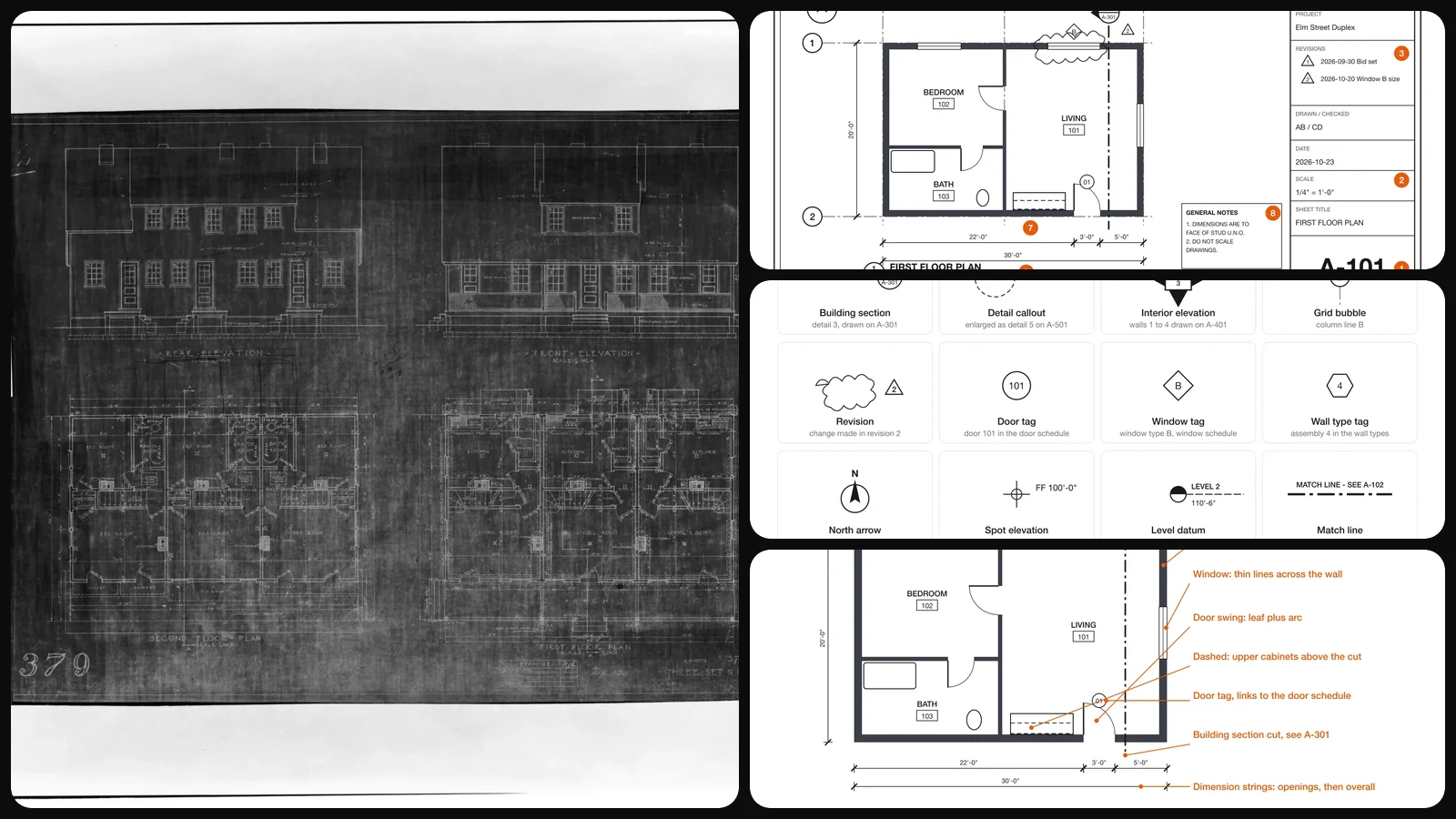
A full construction set can run past a hundred sheets, and the first time you unroll one it looks like a wall of lines. It is not. A drawing set is a tightly cross-referenced document with a small, consistent vocabulary, and once you know where to look first, it reads more like an index than a picture.
This guide walks through that vocabulary in the order an experienced superintendent actually reads a set. Every diagram below was drawn for this guide; the real 1940s blueprint further down shows that the conventions have barely changed in 80 years.
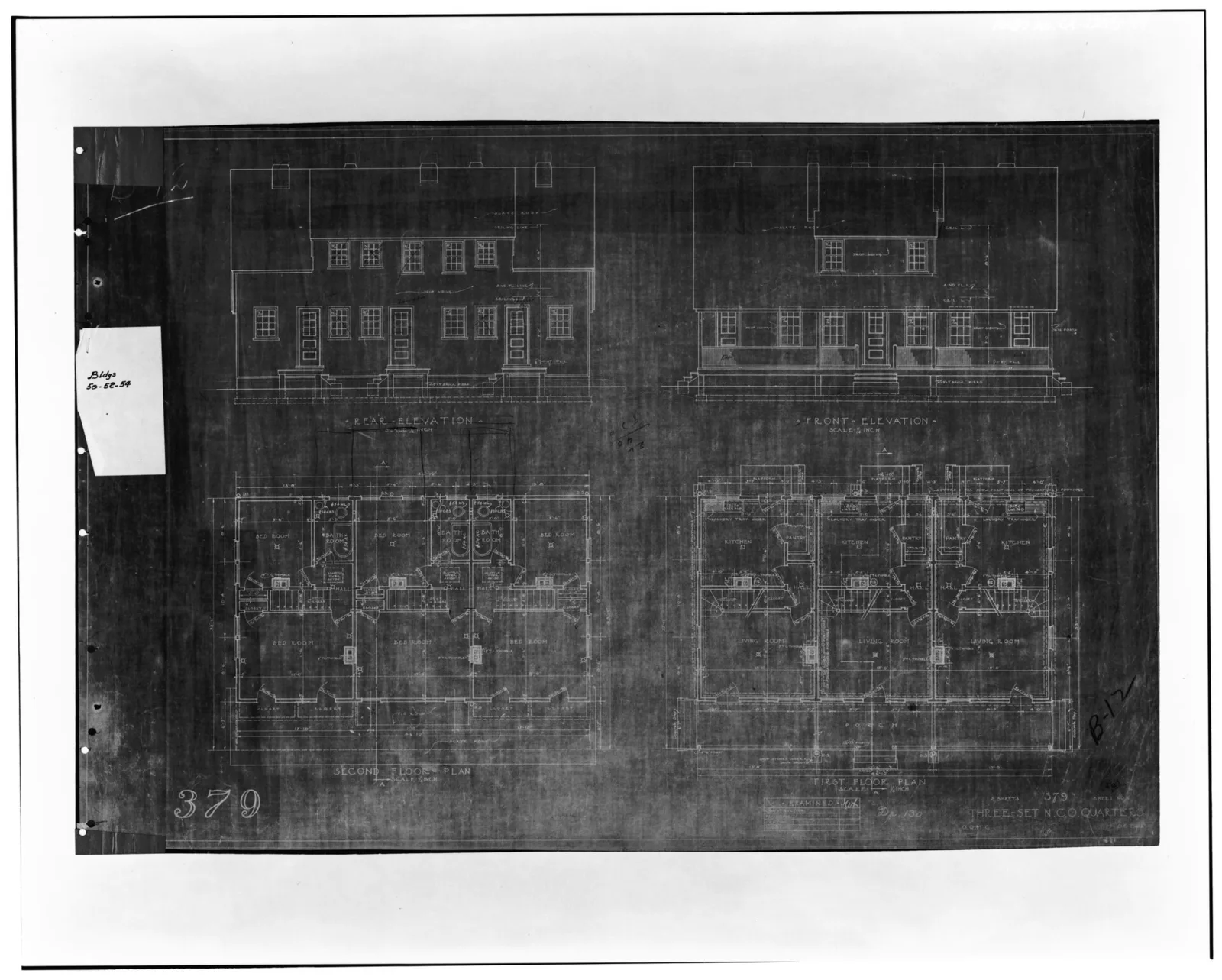
An original working drawing for NCO quarters at Fort MacArthur, from the Historic American Buildings Survey. Elevations on top, floor plans below, view titles and scales under each drawing: the same layout logic a modern set uses.
Why they are still called blueprints
Until the second half of the 20th century, drawings were copied with the cyanotype process, which produced white lines on a deep blue background. The name outlived the chemistry. Today a "blueprint" is a plotted or PDF construction drawing with black lines on white, but the reading rules are the same. Designers and contractors usually call the whole package the construction documents or the drawing set.
Start in the corner: anatomy of a sheet
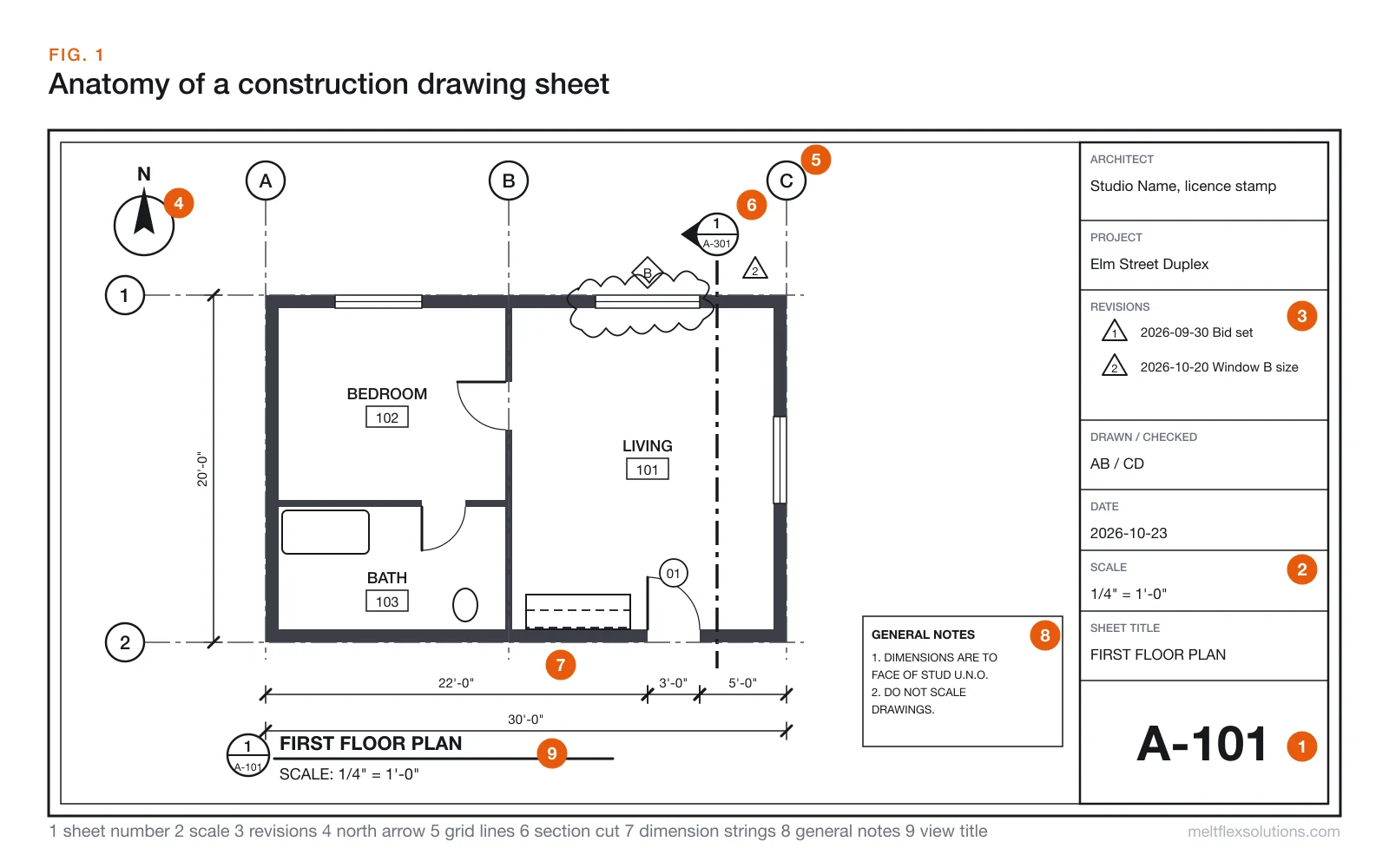
Before you look at any drawing, read the frame around it:
- Sheet number (A-101), large, in the bottom right corner of the title block. This is how every other sheet refers to this one.
- Scale in the title block, and again under each view. A single sheet can hold drawings at several scales.
- Revisions. A list of issue dates with numbered triangles (deltas). The same triangle appears next to a cloud on the drawing wherever that revision changed something.
- North arrow. Plans are rarely drawn with north straight up. The arrow tells you which wall faces the street, the sun or the neighbour.
- Grid lines. Letters one way, numbers the other, running through column and wall centres. "Column at C-2" is how a whole job site describes locations.
- Section cut marker. Shows where a building section was taken and which sheet it is drawn on.
- Dimension strings. Chains of dimensions outside the plan, from small openings to the overall size.
- General notes. Rules that apply to the whole sheet, such as "dimensions to face of stud unless noted otherwise".
- View title. The bubble and line under each drawing: view number, name and scale.
Decode the sheet number
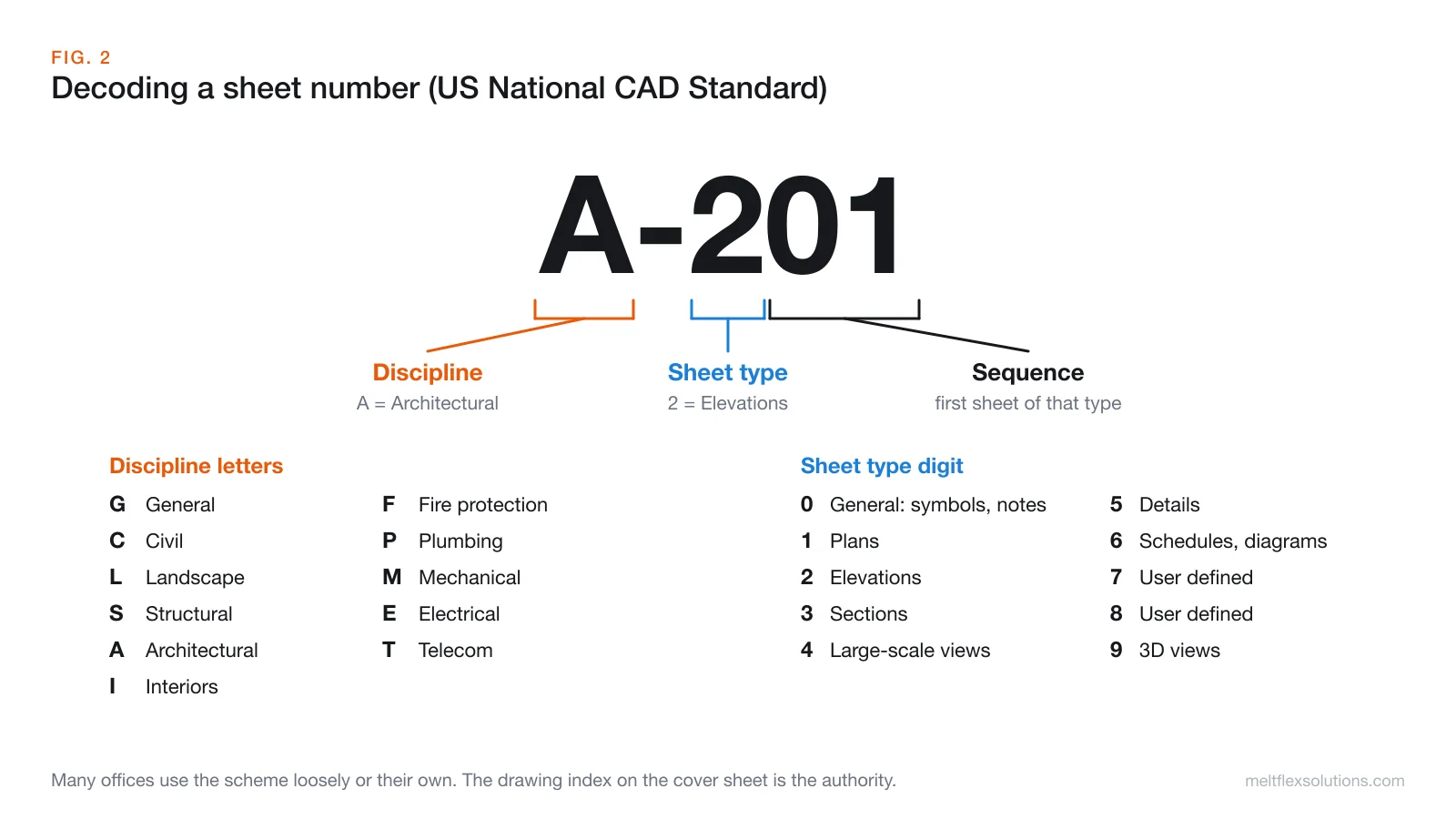
Most US sets follow, at least loosely, the sheet identification scheme of the US National CAD Standard. The format is discipline letter, a dash, a sheet type digit, then a sequence number.
| Letter | Discipline | Digit | Sheet type | |
|---|---|---|---|---|
| G | General | 0 | General: symbols, legends, notes | |
| C | Civil | 1 | Plans | |
| L | Landscape | 2 | Elevations | |
| S | Structural | 3 | Sections | |
| A | Architectural | 4 | Large-scale views (enlarged plans, stairs) | |
| I | Interiors | 5 | Details | |
| F | Fire protection | 6 | Schedules and diagrams | |
| P | Plumbing | 7 to 8 | User defined | |
| M | Mechanical | 9 | 3D views | |
| E | Electrical |
So A-301 is the first architectural section sheet, S-501 a structural details sheet and E-101 the first electrical plan. Not every office follows the scheme exactly. The drawing index on the cover sheet is the authority.
Learn the callout symbols first
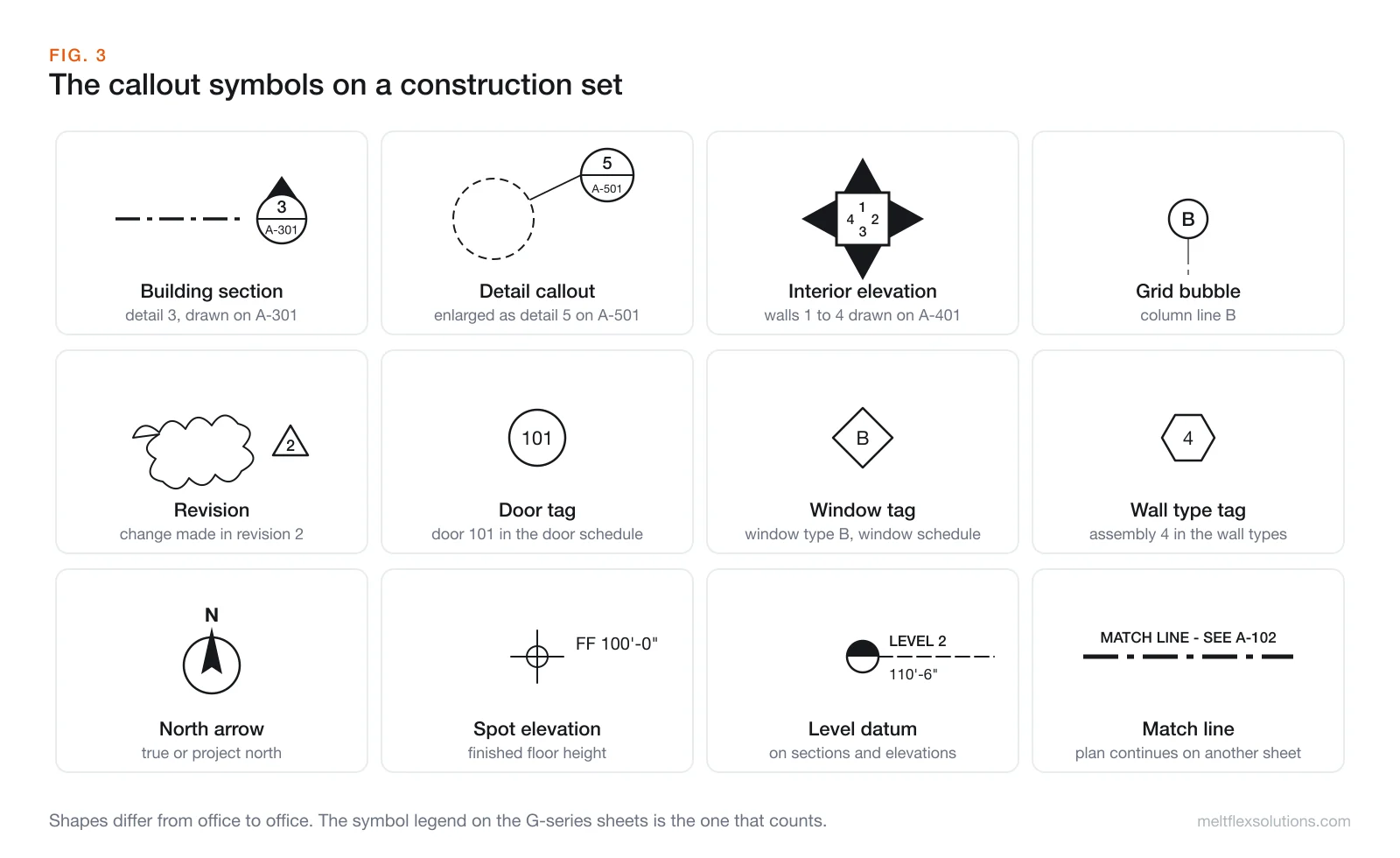
Callouts are what turn a stack of sheets into one document. The pattern behind almost all of them is a circle split in two: the top number is the drawing number, the bottom code is the sheet it is on.
- Building or wall section marker. A cut line with a split circle and a solid triangle or arrow pointing the way you look. "3 over A-301" means the section is drawing 3 on sheet A-301.
- Detail callout. A dashed circle or box around an area, with a leader to a split circle. The enlarged detail lives on the sheet named in it.
- Interior elevation marker. A square or circle with up to four arrows, each numbered. Each arrow points at a wall that is drawn as an elevation elsewhere.
- Grid bubble. A circle at the end of a grid line with its letter or number.
- Revision cloud and delta. A scalloped cloud around a change, tagged with the revision number in a triangle.
- Door, window and wall type tags. Small symbols that link an opening or a wall to a schedule or a wall-type table, where size, hardware, fire rating or construction are listed. Shapes vary by office; circles for doors and hexagons or diamonds for windows and walls are common.
- Spot elevation and level datum. Heights, given relative to a project datum such as finished floor at 100'-0".
- Match line. Where a plan too big for one sheet continues on another.
Every office draws these a little differently. The symbol legend, usually on a G-series or the first A-series sheet, is the one that counts for that set.
A floor plan is a horizontal section
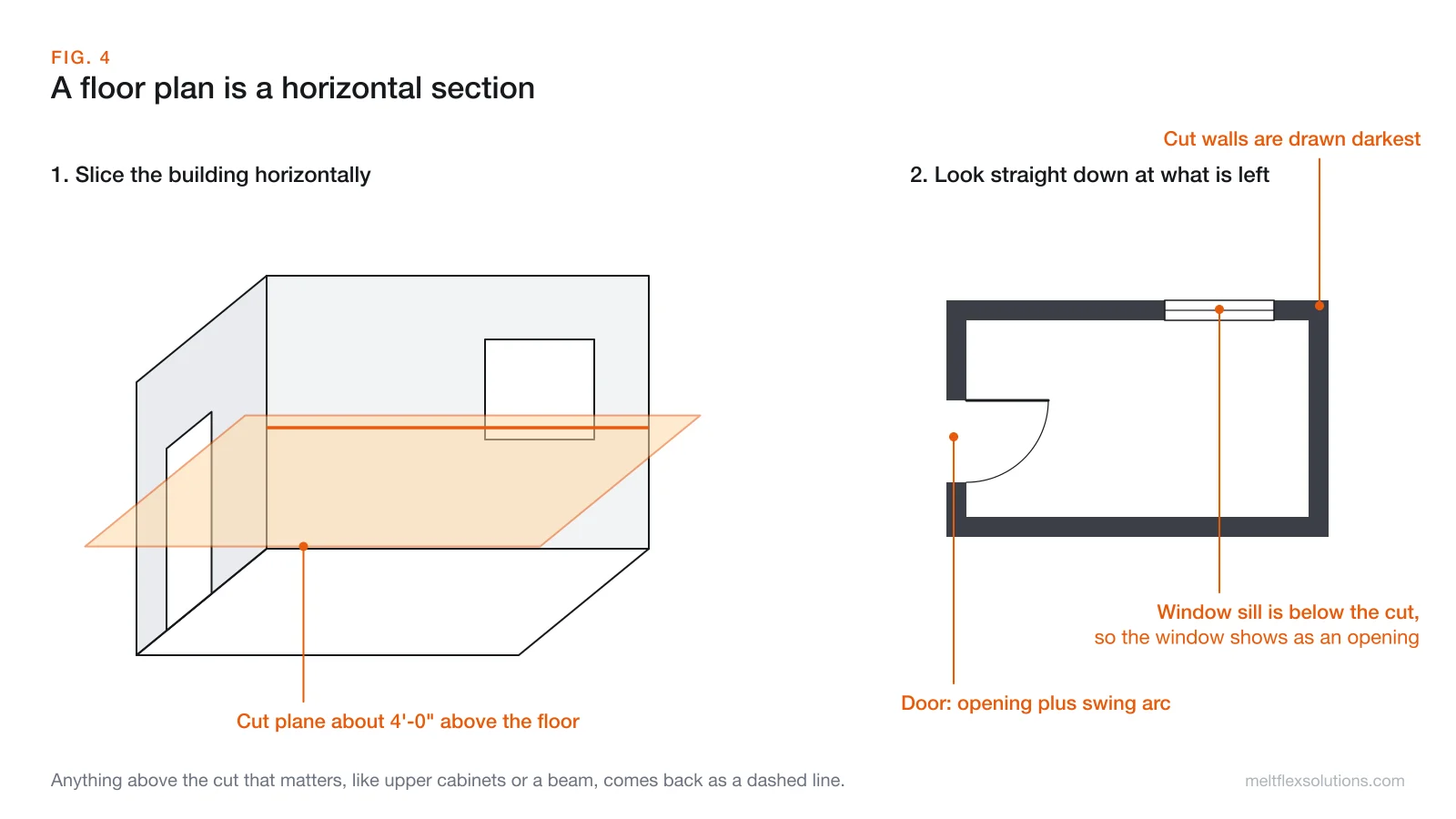
The single most useful idea for reading plans: a floor plan is not a view from the sky. It is a horizontal cut through the building, usually around 4 feet (about 1.2 m) above the floor, looking down.
That explains most of what you see:
- Walls cut by the plane are drawn darkest, often filled or hatched.
- Windows show as openings with thin lines across the wall, because the cut passes through the glass.
- Doors show as an opening plus a swing arc, so you can check that the door clears furniture and other doors.
- Things below the cut (counters, fixtures, floor finishes) are drawn as visible lines.
- Things above the cut that matter (upper cabinets, beams, skylights, soffits) come back as dashed lines.
This is the same idea as a section view in mechanical drawing, just turned horizontal. Our guide to section views shows the cutting conventions in detail.
Reading the floor plan itself
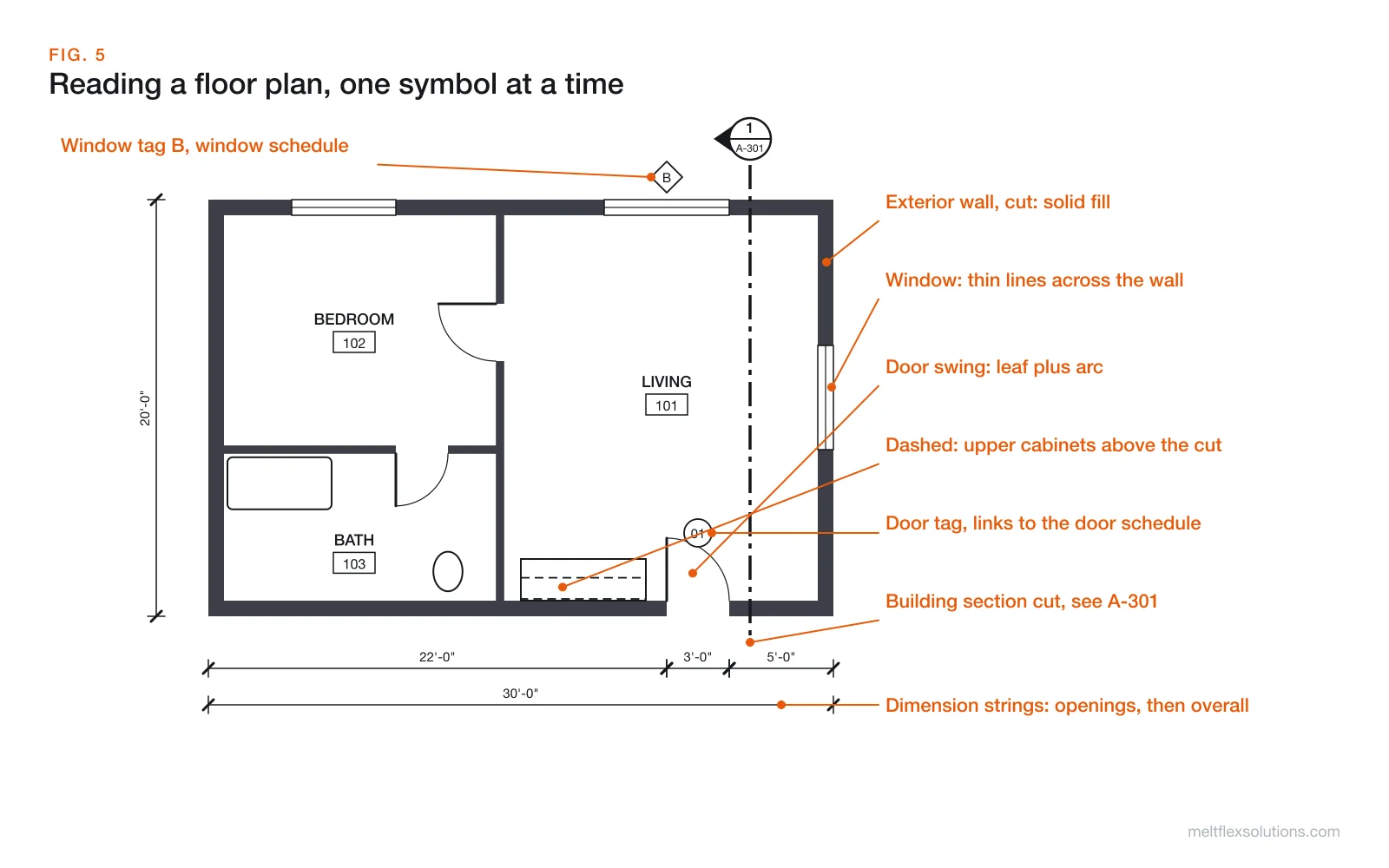
Go through a plan in layers, not all at once:
- Walls and openings. Trace the exterior walls, then the interior partitions. Find every door and window.
- Room names and numbers. Room 102 in the plan is room 102 in the door schedule, the finish schedule and the electrical plan.
- Tags. Note door, window and wall tags and look them up in their schedules. The plan shows where; the schedule says what.
- Dimensions. Read the outermost string for overall size, then the inner strings for walls and openings.
- Callouts. Follow section, elevation and detail markers to the sheets they point at. This is where the real construction information lives.
Dimensions: what they are measured to
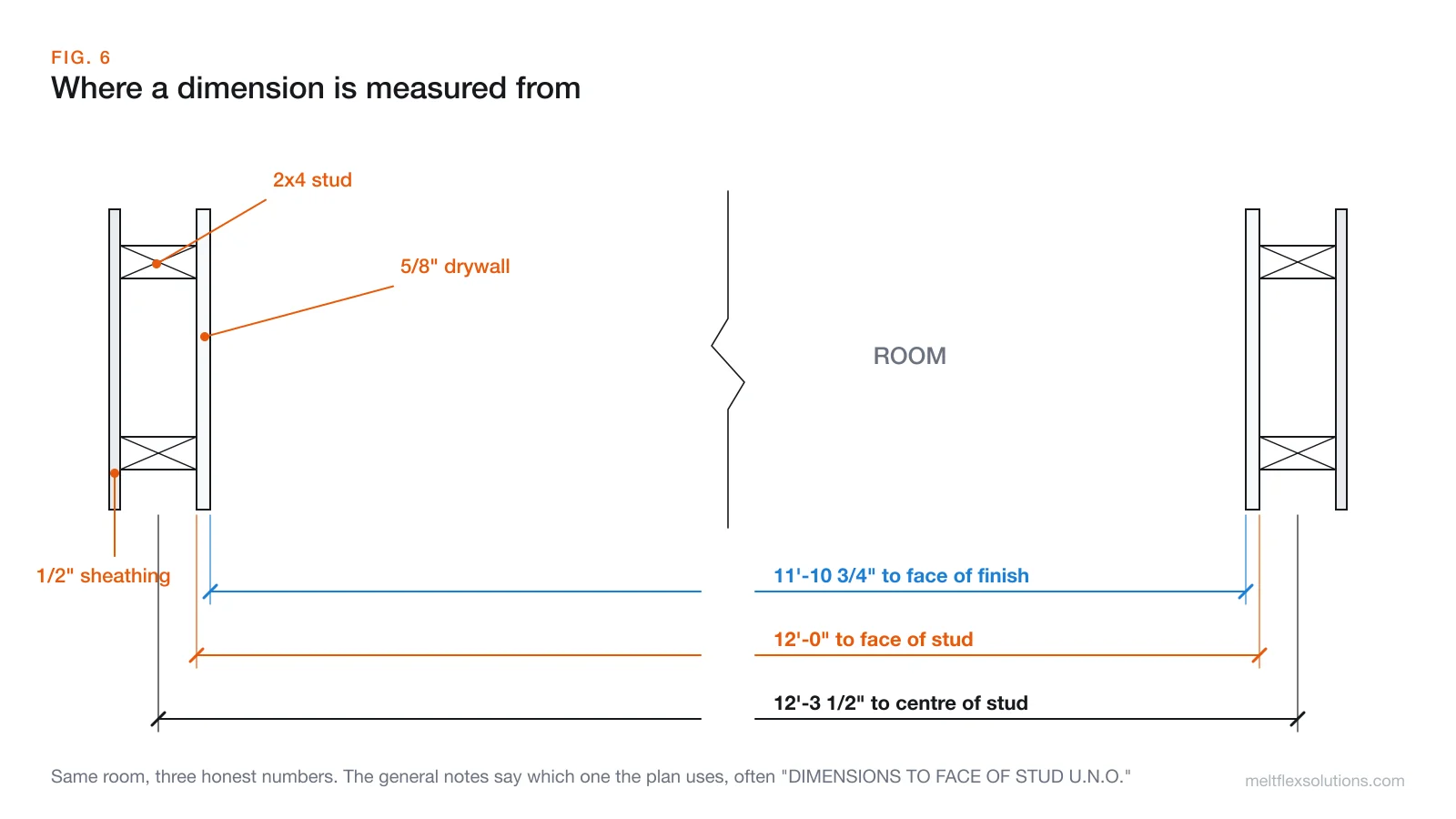
Two rules prevent most dimension mistakes:
- Written dimensions govern. Never measure the drawing with a ruler to find a size that is not written. Sheets are printed, scanned and reduced, and a missing dimension is a question for the architect (an RFI), not a guess.
- Know the reference face. A 12'-0" room can be measured to face of stud (the framing), centre of stud or face of finish (the drywall). With 5/8" drywall on both walls, the finished room is 11'-10 3/4". The general notes say which convention the set uses, usually as "DIMENSIONS TO FACE OF STUD U.N.O."
Feet and inches are written 12'-6 1/2": twelve feet, six and a half inches. The dash just separates feet from inches.
Abbreviations you will see on every set
| Abbreviation | Meaning |
|---|---|
| U.N.O. | Unless noted otherwise |
| TYP. | Typical: applies to all similar conditions |
| O.C. | On centre (spacing of studs, joists, rebar) |
| A.F.F. | Above finished floor |
| T.O. / B.O. | Top of / bottom of (T.O. SLAB, B.O. BEAM) |
| F.F. or FIN. FLR. | Finished floor |
| CLR. | Clear: inside dimension with nothing in the way |
| EQ. | Equal: space these evenly |
| V.I.F. | Verify in field before building |
| N.I.C. | Not in contract |
| C.L. or ℄ | Centre line |
The full abbreviation list for the set is usually on the first G or A sheet.
Material hatches in sections and details
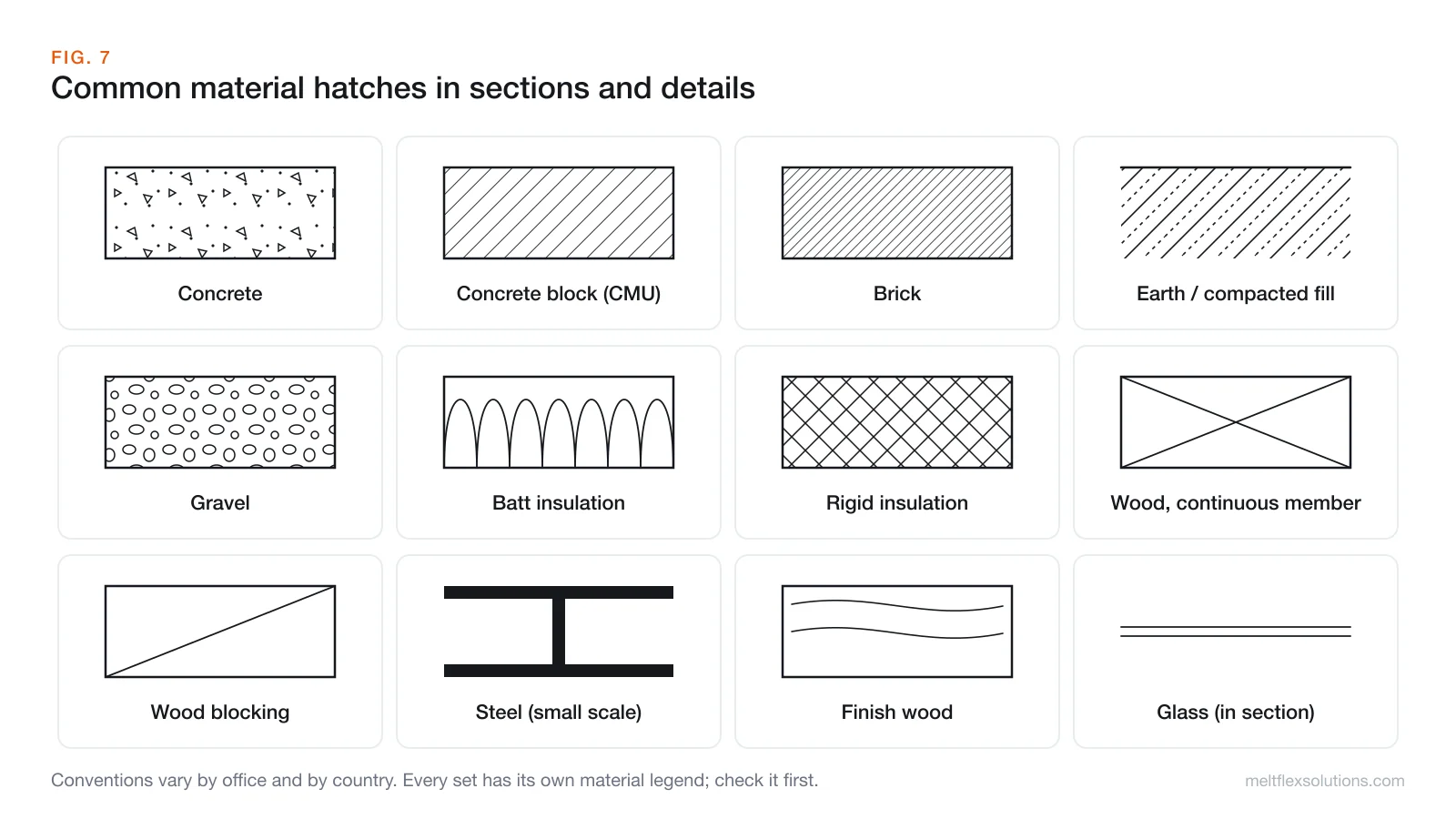
On wall sections and details, each material gets its own pattern so you can read a wall build-up at a glance: concrete with stipple and aggregate, block or brick with diagonal lines, batt insulation as loops, rigid insulation crossed, framing lumber as a box with an X and blocking with a single diagonal. These are conventions rather than law; every set should have a material legend, and that legend wins.
Scale, and why you should not scale off the sheet
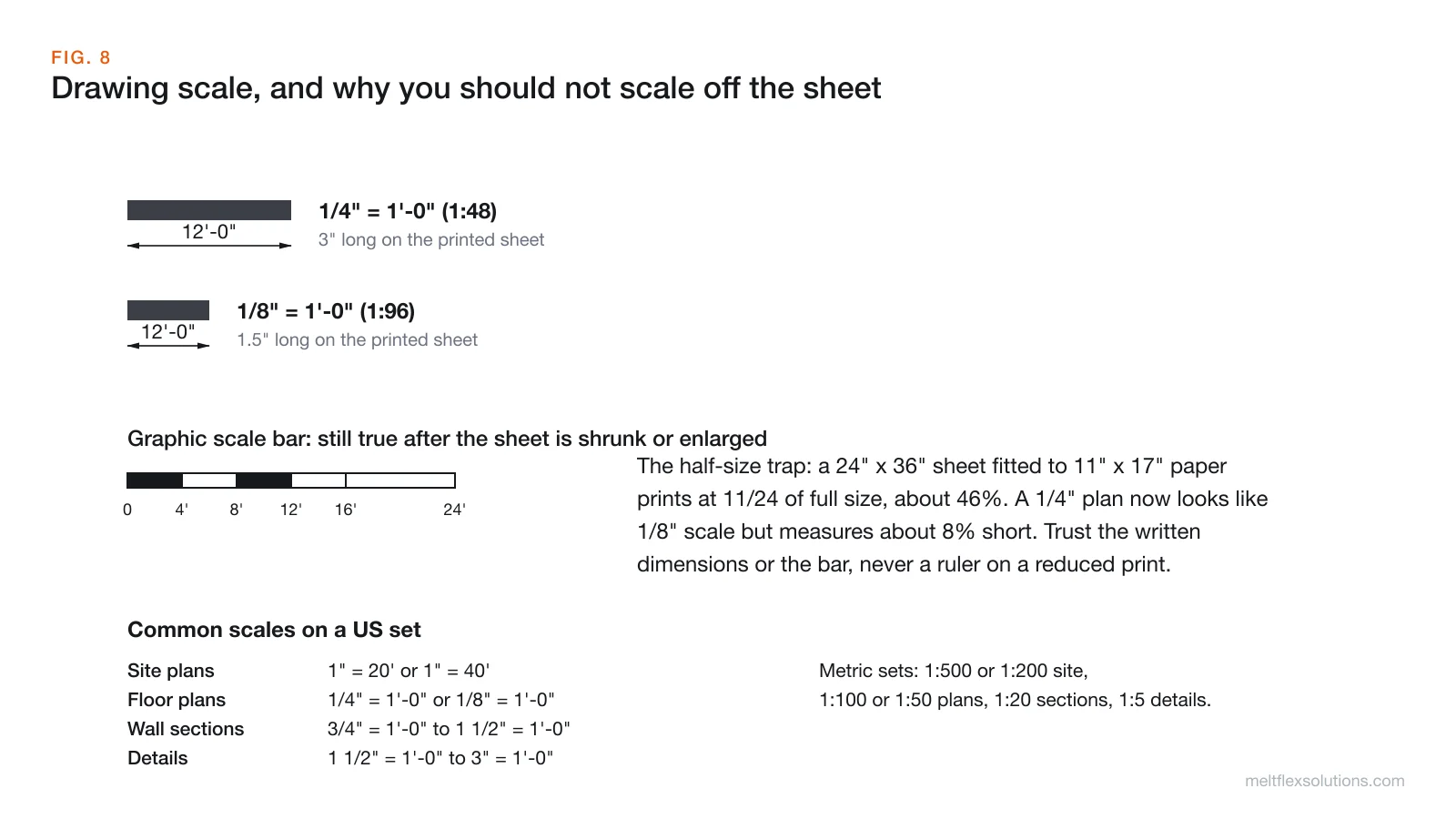
A scale like 1/4" = 1'-0" means a quarter inch on the sheet represents one foot of building, a ratio of 1:48. The common ones:
| Drawing | Typical US scale | Ratio | Typical metric |
|---|---|---|---|
| Site plan | 1" = 20' or 1" = 40' | 1:240 or 1:480 | 1:200 or 1:500 |
| Floor plans, elevations | 1/4" = 1'-0" or 1/8" = 1'-0" | 1:48 or 1:96 | 1:50 or 1:100 |
| Wall sections | 3/4" = 1'-0" to 1 1/2" = 1'-0" | 1:16 to 1:8 | 1:20 |
| Details | 1 1/2" = 1'-0" to 3" = 1'-0" | 1:8 to 1:4 | 1:5 or 1:10 |
The half-size trap. Full-size US architectural sheets are usually 24" x 36" (Arch D). When a set is printed on 11" x 17" paper to carry around site, it shrinks to about 46% of its true size. A 1/4" plan then looks a lot like a 1/8" plan, but it measures about 8% short. A graphic scale bar survives the reduction because it shrinks with the drawing; a ruler does not. Better still, use the written dimensions.
If you do need to convert a scale, for example to check a dimension on a PDF or set up a drawing in CAD, the free Drawing Scale Calculator from TechDraw AI reads scales the way they are written on a sheet, including feet and inches:
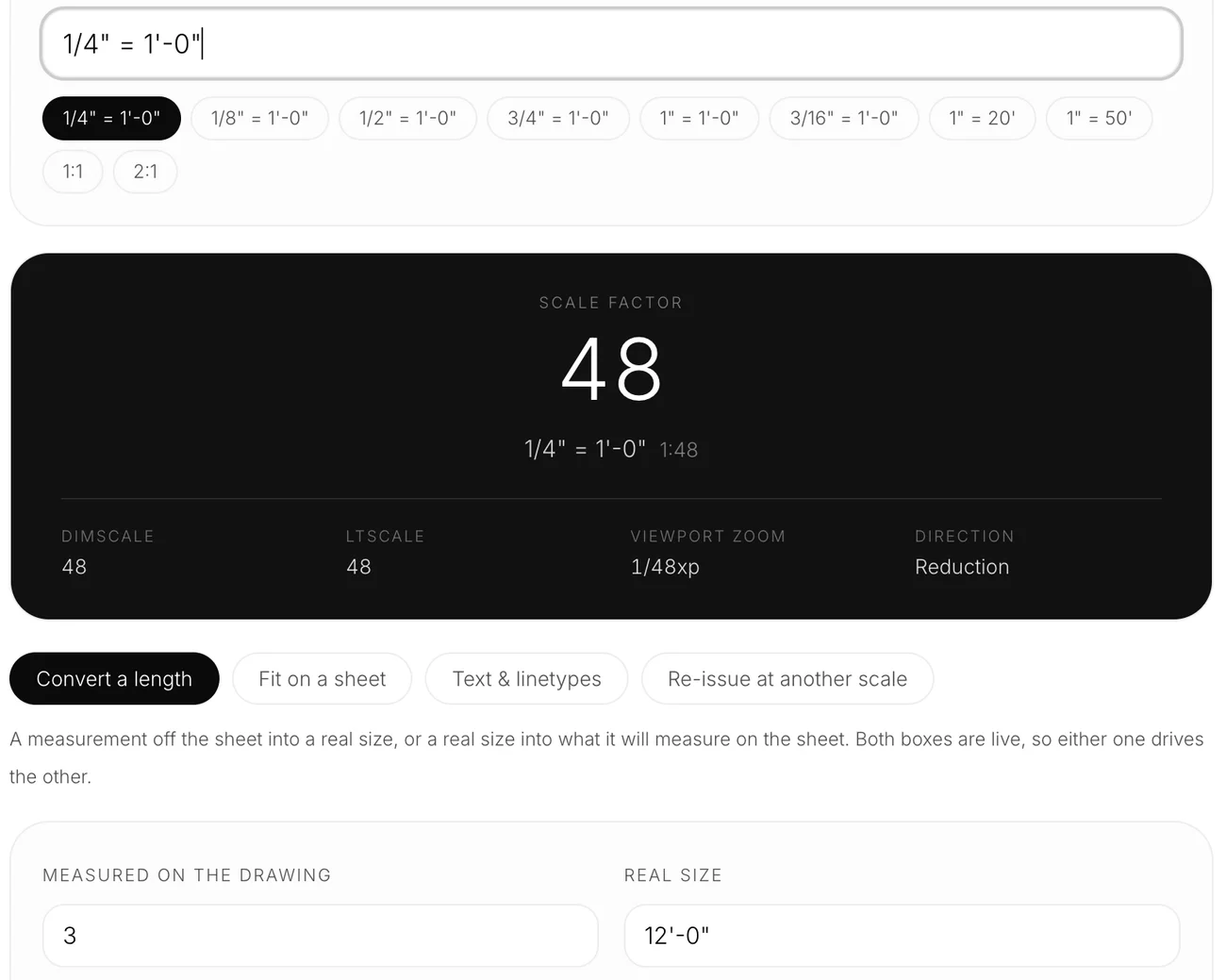
We typed 1/4" = 1'-0" and 3 inches measured on the drawing; it returned scale factor 48 and 12'-0" of real wall, the same wall as in the figure above.
Read the set in this order
- Cover sheet and drawing index. What sheets exist and which revision you are holding.
- General notes, abbreviations and symbol legend (G sheets, first A sheet).
- Site plan. Where the building sits, north, access, utilities.
- Floor plans. Layout, rooms, grid, openings, overall dimensions.
- Exterior elevations. Heights, materials, window positions.
- Building and wall sections. How the building is put together vertically.
- Details. How each connection is actually built.
- Schedules. Doors, windows, finishes, hardware.
- Structural, then MEP (mechanical, electrical, plumbing). Check them against the architectural plans; clashes show up where they overlap.
Drawings work together with the specifications, the written project manual organised by trade. US contracts commonly treat the two as complementary, and any order of precedence is set by the contract. Do not assume the drawing wins.
Video: a 10-minute crash course
Working with old or digital blueprints
Two situations come up again and again on renovation and facilities work, and both are where software helps:
- You receive a DWG and do not have AutoCAD. The free DWG viewer from TechDraw AI opens it in the browser, with pan, zoom and layers, and the file is never uploaded.
- The only record is an old paper print. Scanning it is easy; turning it into an editable CAD file you can trust is the hard part. Our guide to digitizing an old blueprint with AI covers how that works and how to check the dimensions afterwards. TechDraw AI approaches scale the safe way: rather than guessing sizes from pixels, it asks you for a couple of real lengths and derives every other dimension from those, then exports DXF or DWG.
And if you are planning a layout rather than reading one, our overview of AI floor plan generators covers what those tools can and cannot produce.
Frequently asked questions
What is the first thing to look at on a set of blueprints?
Start with the cover sheet and drawing index, then the general notes, abbreviations and symbol legend. They tell you what is in the set, which revision you have, and how the drawings are meant to be read, before you look at any plan.
What do the letters and numbers in a sheet number mean?
In the US National CAD Standard scheme, the letter is the discipline (A architectural, S structural, M mechanical, E electrical, P plumbing), the first digit is the sheet type (1 plans, 2 elevations, 3 sections, 5 details) and the last digits are the sequence. A-201 is the first architectural elevation sheet.
What does a circle with a number over another number mean on a blueprint?
It is a cross-reference callout. The top number is the drawing or detail number and the bottom code is the sheet where that drawing is found. For example, 5 over A-501 means detail 5 on sheet A-501.
What does 1/4 inch = 1 foot mean on a blueprint?
It means a quarter inch measured on the drawing represents one foot on the building, a ratio of 1:48. A 12 foot wall at that scale is 3 inches long on a full-size sheet.
Can you measure a blueprint with a ruler?
Only as a rough check on a full-size print. Written dimensions always govern. Reduced prints, such as a 24 by 36 inch sheet printed on 11 by 17 inch paper, are no longer at the stated scale, so a ruler gives wrong sizes. A graphic scale bar stays accurate because it shrinks with the drawing.
What do dashed lines mean on a floor plan?
Usually something above the horizontal cut of the plan, such as upper cabinets, beams, soffits or skylights. Dashed lines can also show hidden or demolished elements, so check the legend for the set.
What does U.N.O. mean on construction drawings?
U.N.O. stands for unless noted otherwise. A note such as dimensions to face of stud U.N.O. sets the default for the whole sheet, and any dimension marked differently overrides it.
How long does it take to learn to read blueprints?
The basics in this guide, sheet numbers, symbols, scale and plan conventions, can be learned in a few days of practice with a real set. Reading quickly and spotting conflicts between disciplines comes with working on actual projects.
Blueprint reading is less about memorising every symbol than about knowing where each kind of information lives and following the cross-references. Pick up any real set, start at the index, and trace one door from the plan to its schedule, elevation and detail; after that, the rest of the set opens up. For the shop and fabrication side of the same drawings, see our guide to welding symbols.
Sources and further reading
- United States National CAD Standard: the sheet identification and drawing conventions most US sets follow.
- Architectural drawing, Wikipedia: drawing types, views and scales.
- Floor plan, Wikipedia: how plans are cut and drawn.
- Blueprint, Wikipedia: the cyanotype process behind the name.
Drowning in drawing revisions, RFIs and plan markups? Book a free call and we will show you which parts of that work can be automated.
Image credits: diagrams by MeltFlex Solutions. Fort MacArthur working drawing, U.S. Army Office of the Quartermaster General, from the Historic American Buildings Survey, Library of Congress, public domain via Wikimedia Commons. TechDraw AI screenshot taken by us on 23 October 2026.