Welding Symbols Explained: How to Read Any Weld Symbol
 Braňo Hrivňák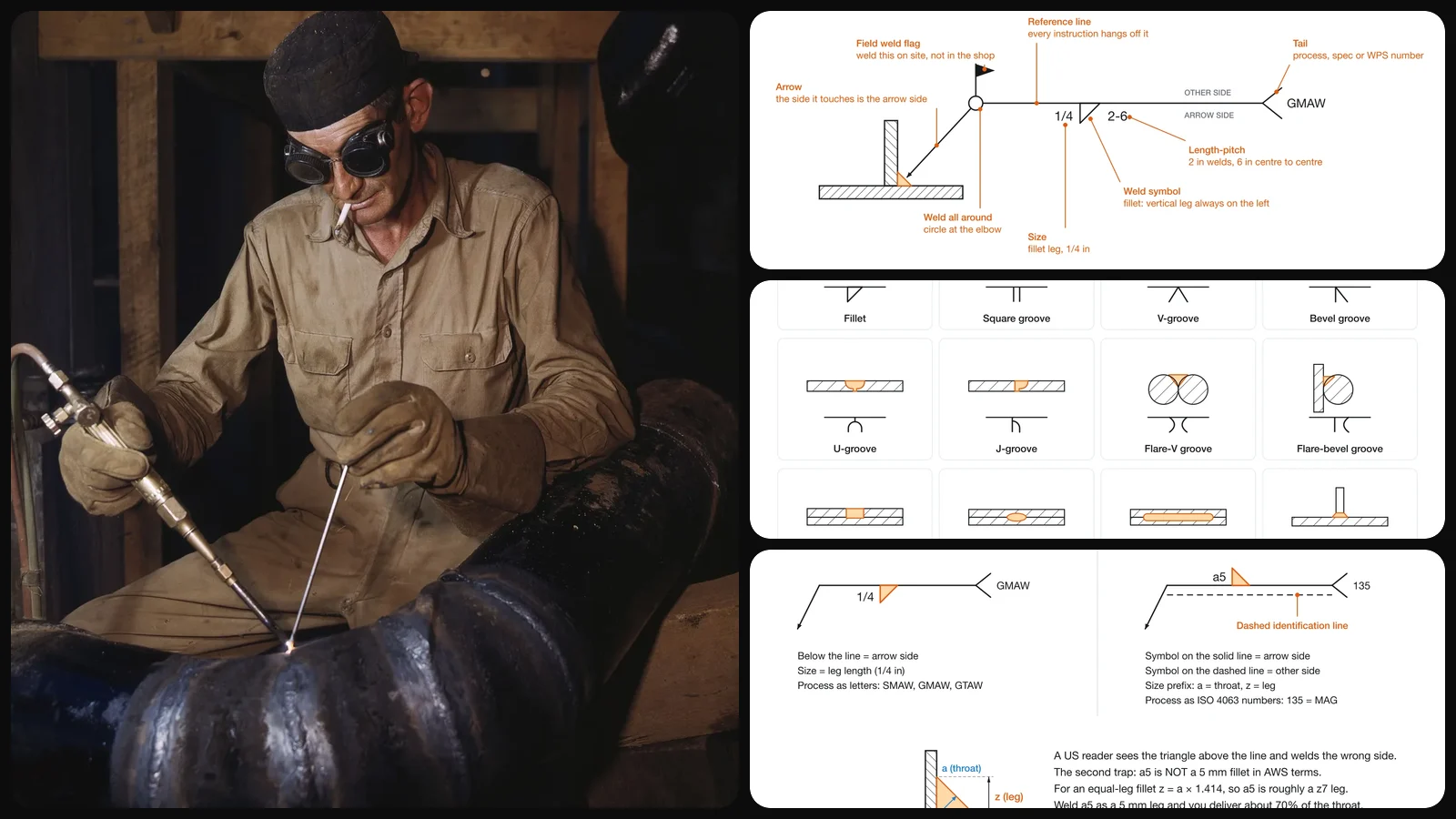
A welding symbol packs a paragraph of instructions into a few strokes: what kind of weld, how big, how long, on which side, made where and finished how. Read it right and the welder, the inspector and the engineer all agree on the same joint. Read it wrong and you get a bracket welded on the wrong face, or a fillet that looks fine and carries 70% of the load it was designed for.
This guide walks through every part of the symbol with drawings we made for it, covers the symbols you will meet on most shop drawings, and spends real time on the two mistakes that cause the most rework: arrow side versus other side, and American versus European notation.
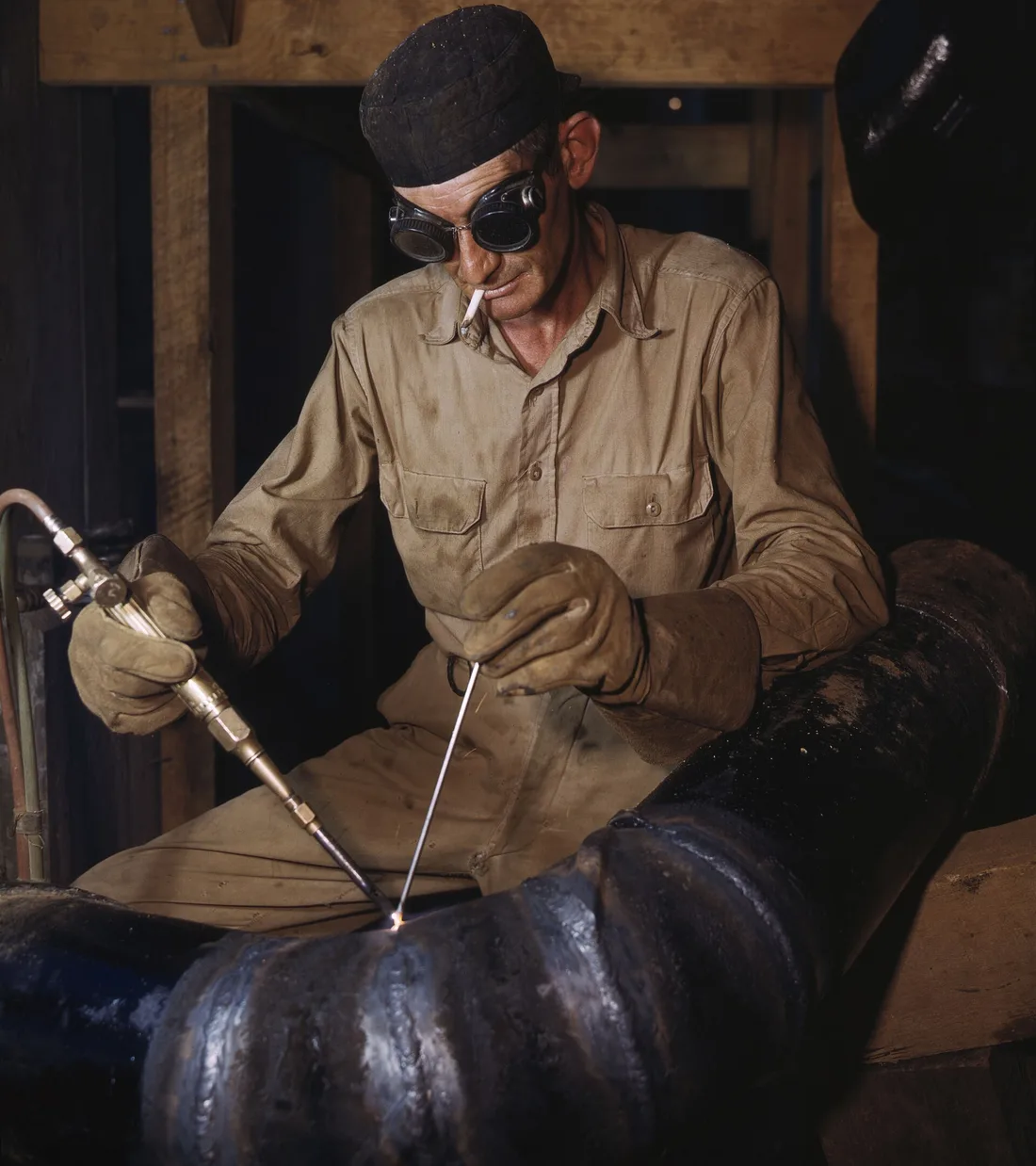
Welding a pipe joint at the TVA Douglas Dam in 1943. The symbols on the drawing have barely changed since; the reference line and arrow were already standard practice.
Weld symbol vs welding symbol
The two terms sound interchangeable and they are not, and the difference helps when you read the standard.
- The weld symbol is the small shape that tells you the type of weld: a triangle for a fillet, a V for a V-groove, a circle for a spot weld.
- The welding symbol is the whole assembly: reference line, arrow, weld symbol, dimensions, tail and any supplementary marks.
In the US the rules come from AWS A2.4, Standard Symbols for Welding, Brazing, and Nondestructive Examination. Most of Europe and many other countries use ISO 2553. They share most of the shapes and differ in a few places that matter, covered further down.
The anatomy of a welding symbol
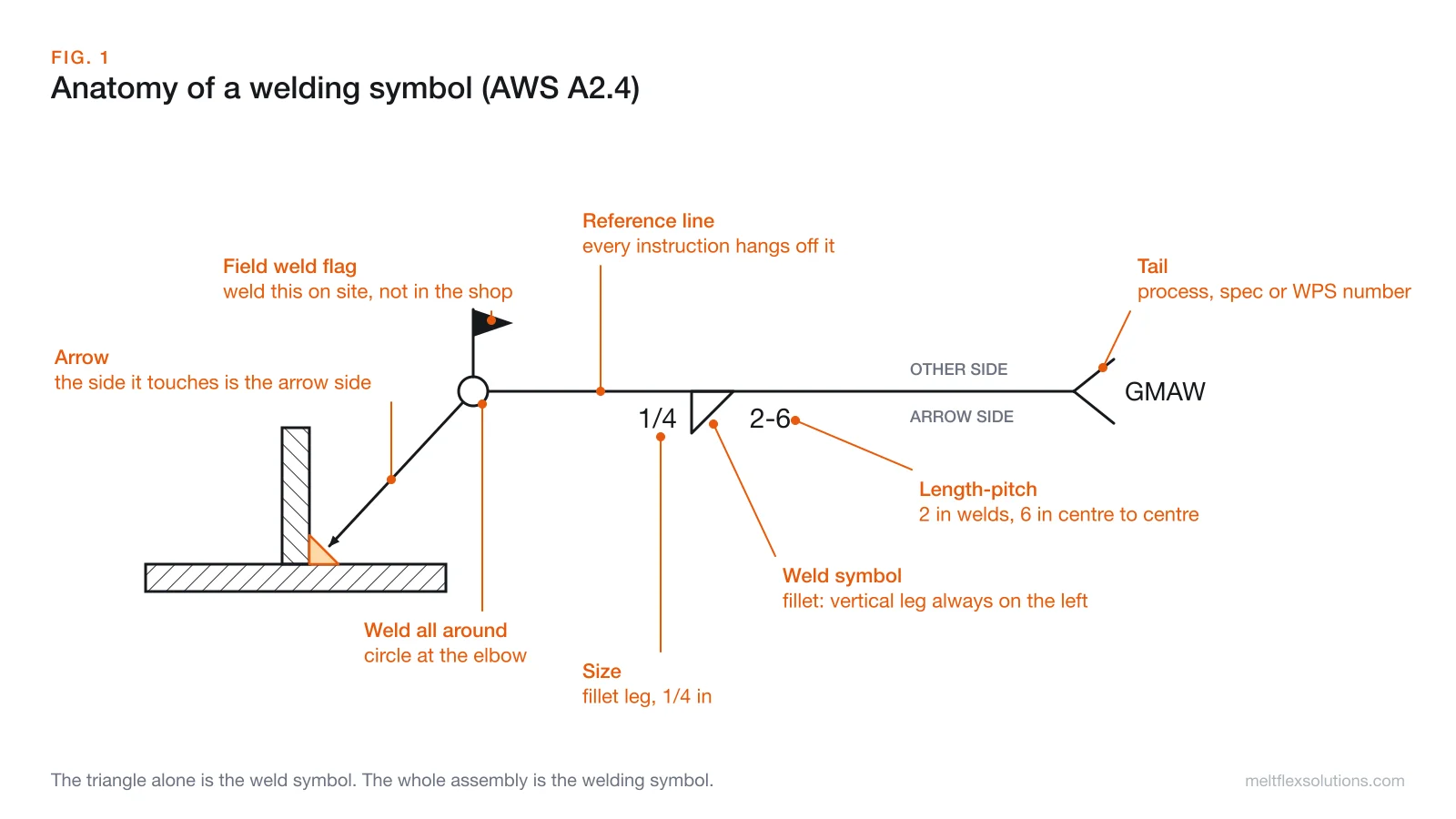
Every part has a fixed place, which is what makes the symbol readable at a glance:
- Reference line. The horizontal line everything hangs off. It is always drawn horizontal, whatever direction the arrow takes.
- Arrow. Connects the reference line to the joint. It can leave from either end and bend in any direction; none of that changes the meaning.
- Weld symbol. The shape that names the weld type, placed below or above the line.
- Size. To the left of the weld symbol. For a fillet it is the leg length.
- Length and pitch. To the right of the weld symbol, written
length-pitch. - Weld-all-around circle. A small circle where the arrow meets the reference line means the weld runs all the way around the joint, for example around a tube or a plate welded to a column.
- Field weld flag. A flag at the same corner means the weld is made on site during erection, not in the shop. Older drawings sometimes show a filled black dot there instead.
- Tail. The fork at the far end. It carries anything the symbol has no slot for: the welding process (SMAW, GMAW, GTAW), a procedure number, a spec reference. No reference needed, no tail.
Arrow side vs other side: the rule that matters most
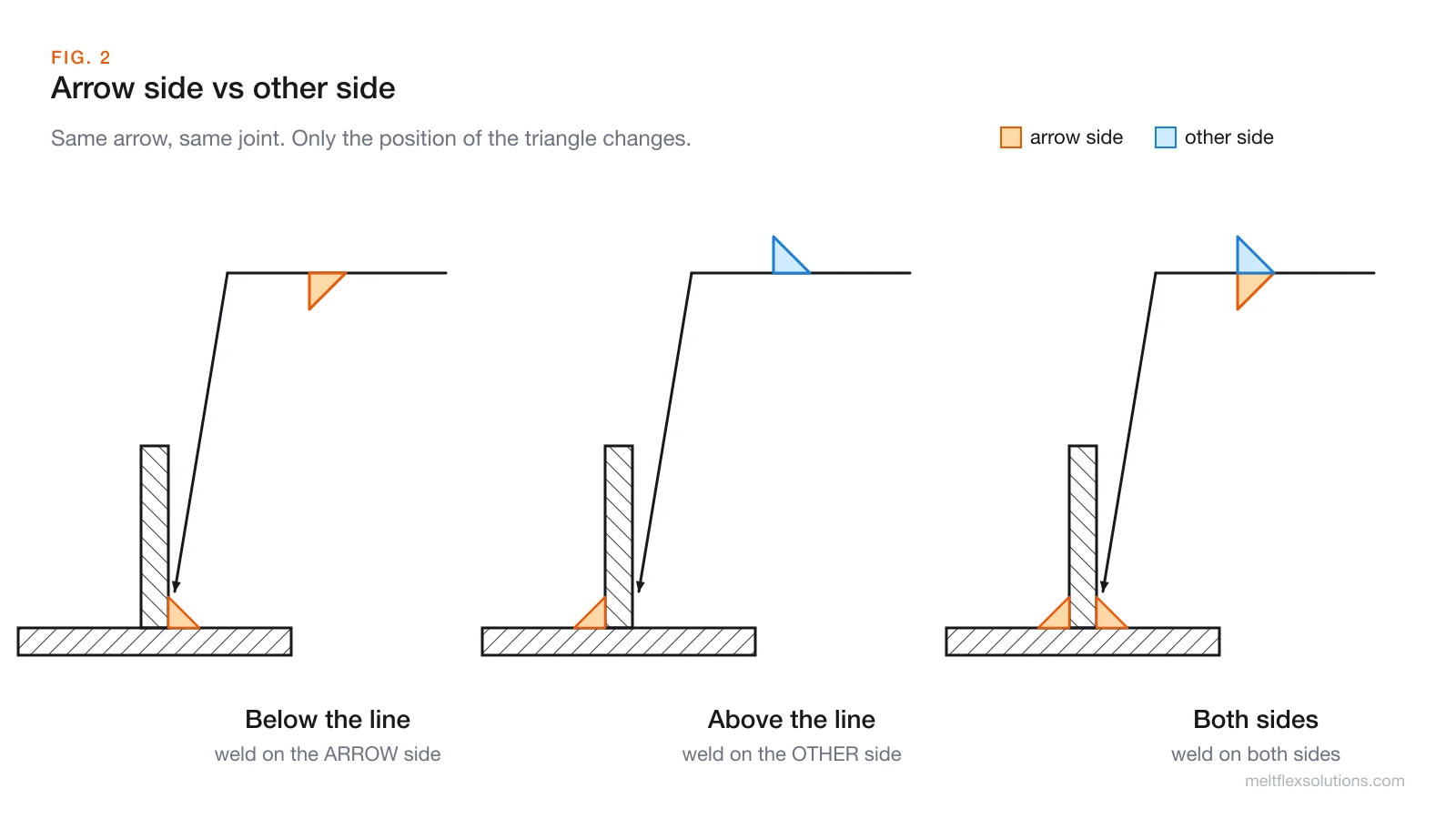
Most joints can be welded from two sides. The symbol tells them apart with one rule:
- Below the reference line = arrow side, the side of the joint the arrow actually touches.
- Above the reference line = other side, the opposite side of the same joint.
- Symbols on both sides of the line mean weld both sides, each with its own size and length if they differ.
This holds whichever way the arrow points and whichever end of the line it leaves from. "Arrow side" also does not mean near or far, top or bottom. It is purely the side the arrow tip lands on, so the detailer controls the meaning by which face of the joint they touch.
For bevel and J-groove welds, where only one of the two parts gets its edge prepared, the arrow carries a break (a kink) that points at the part to be bevelled. When it does not matter which part is prepared, the break is left out.
The basic weld symbols, with the weld each one asks for
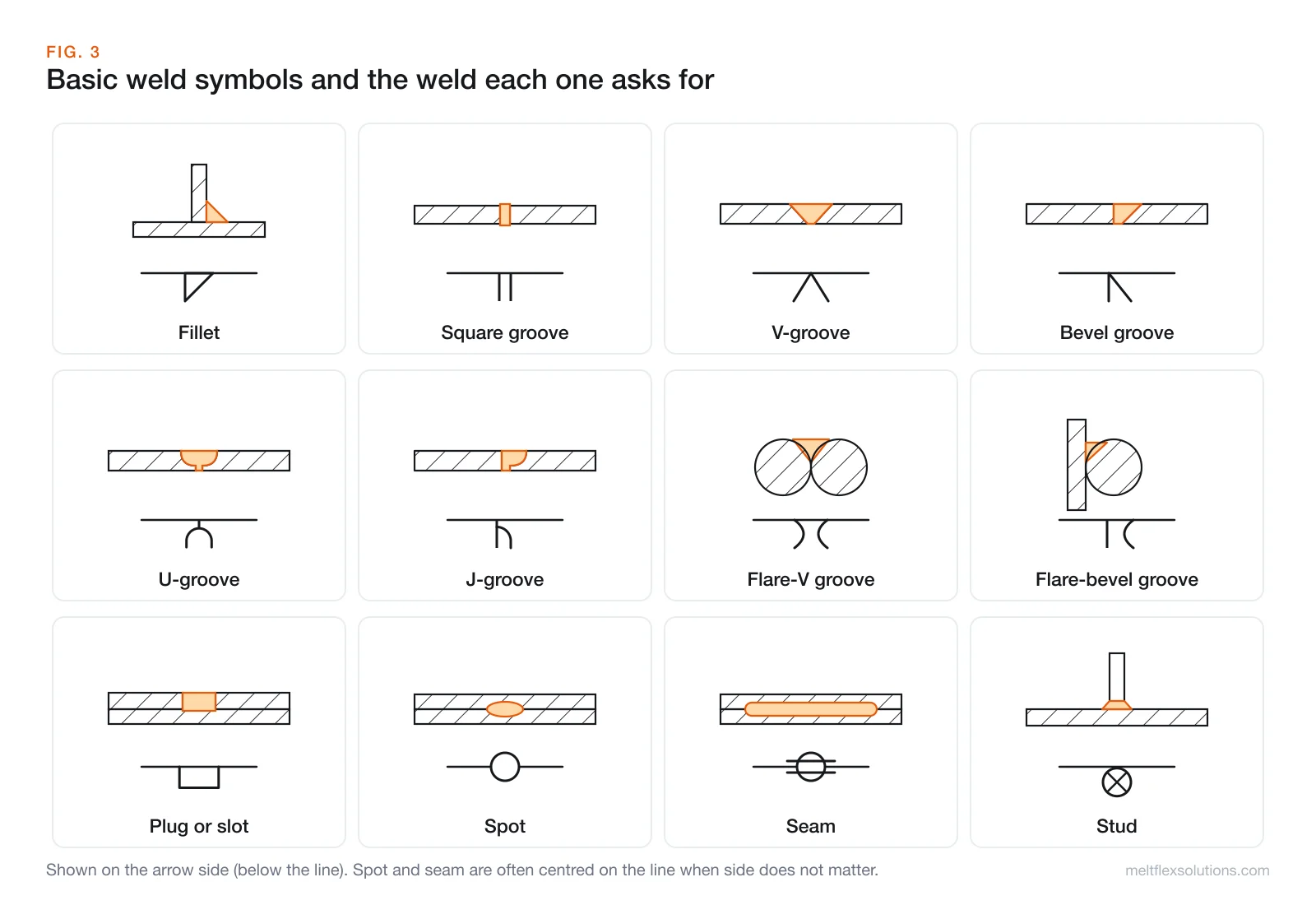
The weld symbol is a simplified cross-section of the weld, drawn with its root on the reference line. Once you see that, the shapes stop being arbitrary:
| Symbol | Weld | Where you see it |
|---|---|---|
| Right triangle | Fillet | T-joints, lap joints, corners. By far the most common weld on structural and fabrication drawings. The vertical leg is always drawn on the left. |
| Two parallel lines | Square groove | Thin material butted edge to edge with no edge prep. |
| V | V-groove | Both edges bevelled. Plate butt joints. |
| One vertical leg plus a slant | Bevel groove | Only one edge bevelled, common on T-joints needing full strength. |
| Cup on a stem | U-groove | Both edges given a curved prep, for thick sections. |
| Vertical leg plus half a cup | J-groove | One edge curved, the other square. |
Two arcs, )( | Flare-V | Two rounded parts, such as two bars or two bent edges. |
Vertical leg plus an arc, |( | Flare-bevel | A round part against a flat one, like a bar on a plate. |
| Rectangle | Plug or slot | Fills a hole or slot in the top plate of a lap joint. |
| Circle | Spot | Resistance or arc spot welds on lapped sheet. |
| Circle with two lines | Seam | A continuous line of overlapping spots. |
| Circle with an X | Stud | Studs or shear connectors welded to a plate. |
Reading fillet weld dimensions
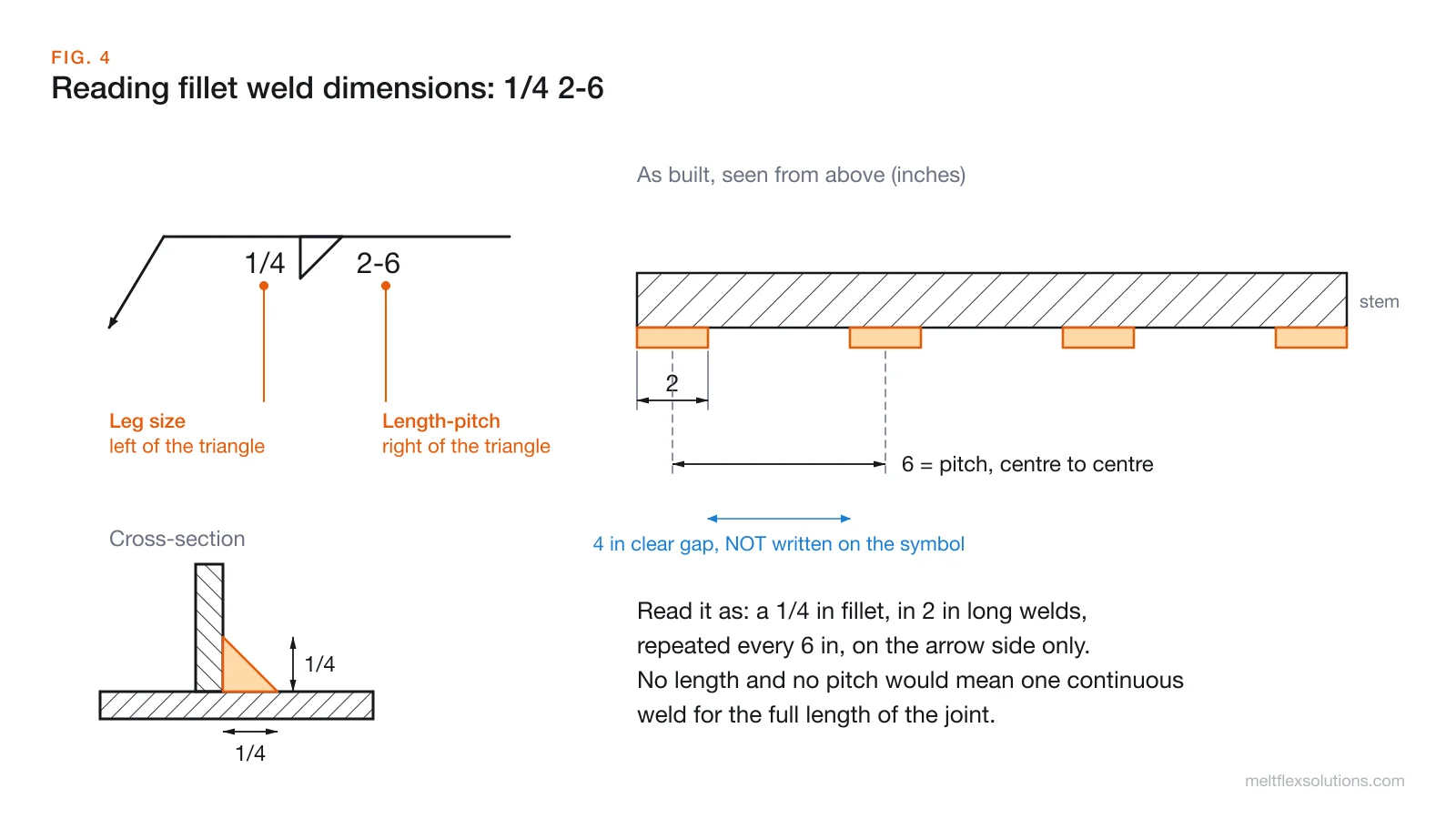
Take the symbol 1/4 ◺ 2-6 on the arrow side:
- 1/4 to the left is the leg size: a fillet with two 1/4 in legs.
- 2 is the length of each weld segment.
- 6 is the pitch: the distance from the centre of one segment to the centre of the next.
So the joint gets 2 in welds every 6 in, which leaves a 4 in clear gap between them. That gap is never written on the symbol, and reading the 6 as the gap is one of the most common mistakes on the shop floor: the welds end up on 8 in centres and the joint loses a quarter of its weld.
A few more rules worth knowing:
- No length at all means a continuous weld the full length of the joint, or between the dimension lines if the drawing gives them.
- Unequal legs are written as two sizes, for example
1/4 x 3/8, and the drawing shows which leg runs along which part.
Chain vs staggered intermittent welds
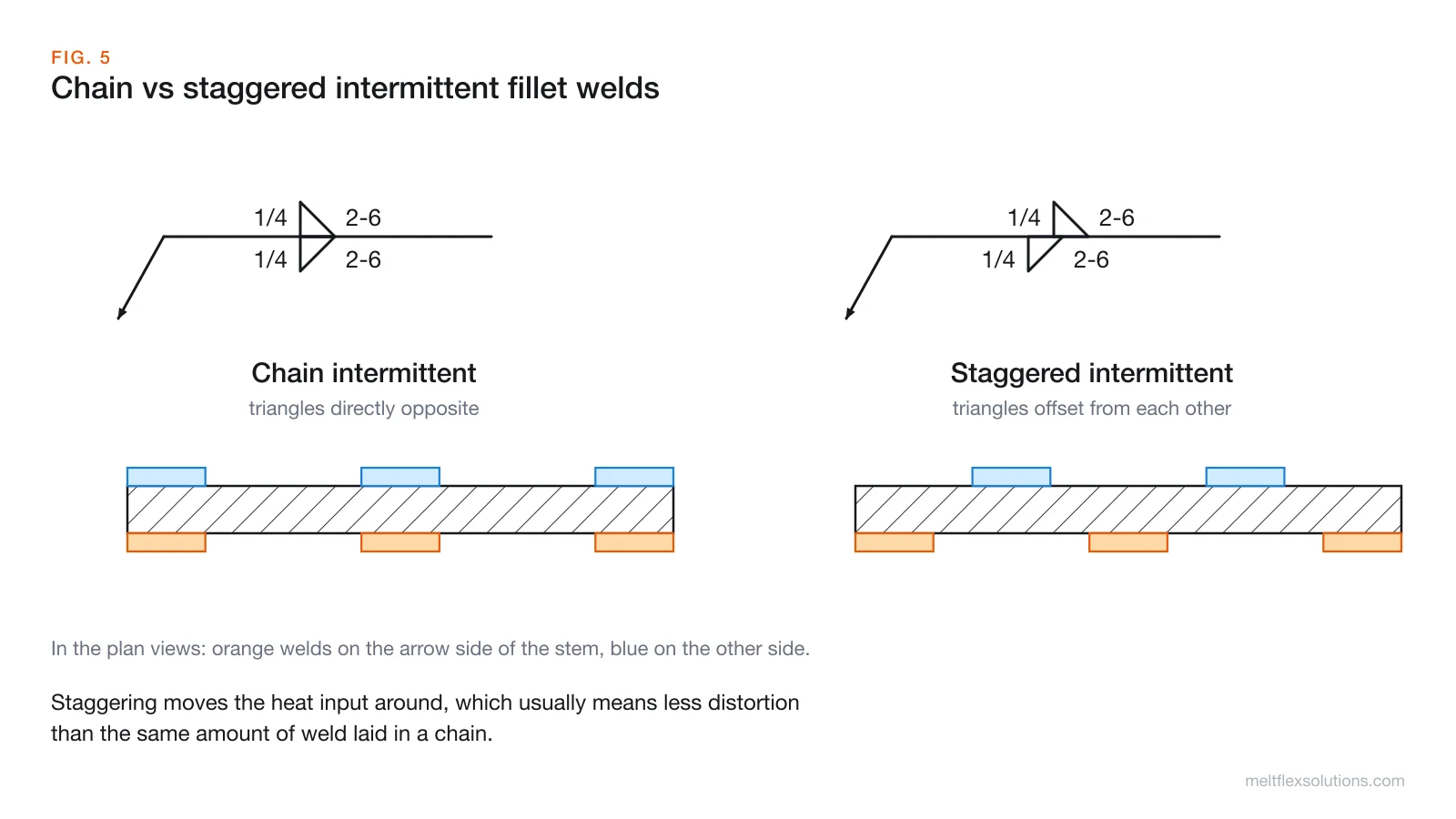
When both sides of a joint get intermittent welds, the symbol shows how they line up. Triangles directly opposite each other mean a chain pattern: the segments sit across from each other. Triangles offset from each other mean a staggered pattern: the welds on one side fall in the gaps of the other. Staggering spreads the heat, which usually means less distortion for the same amount of weld.
Reading groove weld dimensions
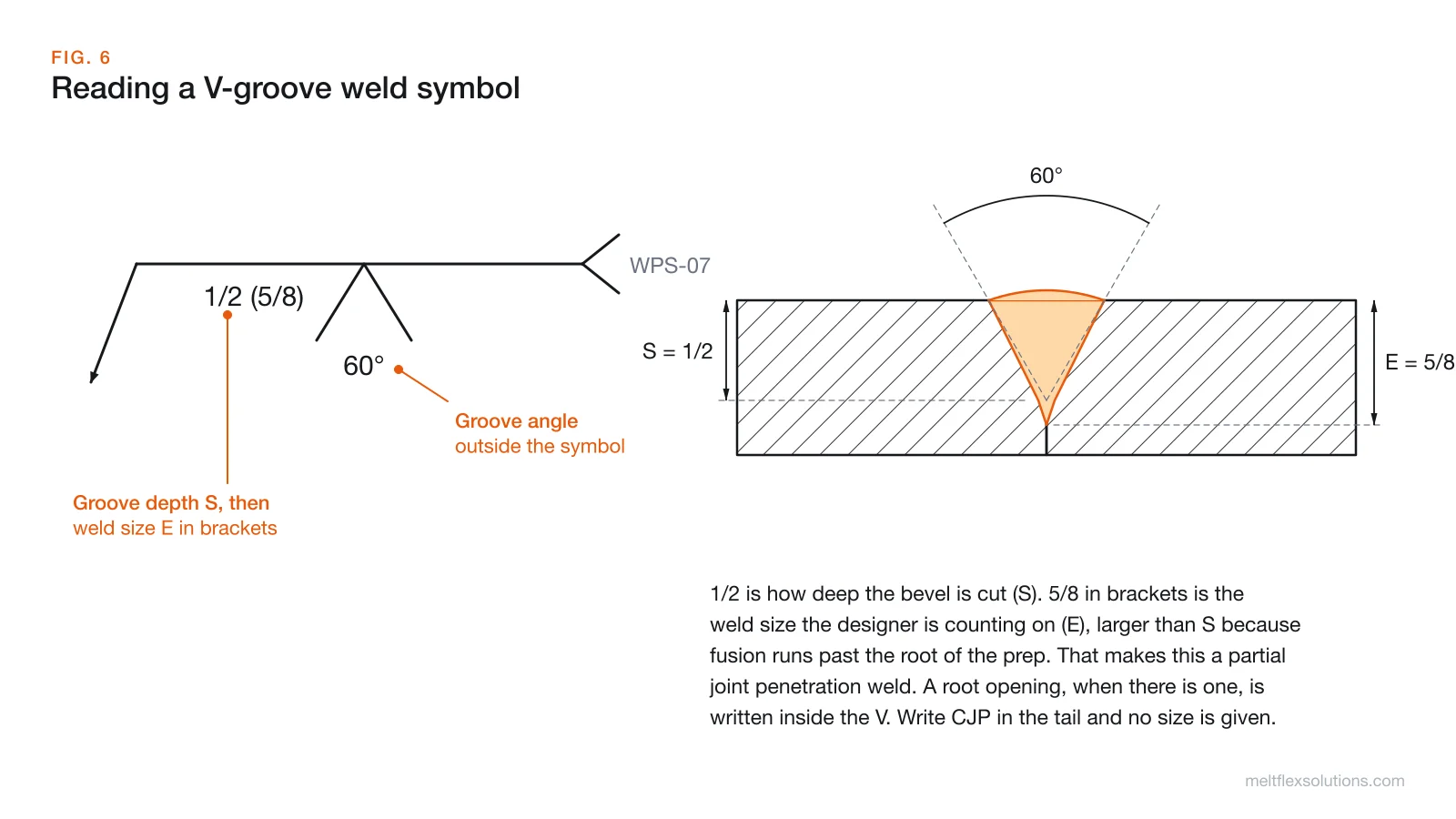
Groove welds carry more information than fillets, and each number has a fixed place:
- Groove depth (S) goes to the left of the symbol: how deep the edge preparation is cut.
- Weld size (E) follows in brackets,
1/2 (5/8): the effective throat the designer is counting on. It can exceed S because fusion runs past the bottom of the prep. - Root opening goes inside the symbol, the gap between the parts at the root.
- Groove angle goes outside the symbol, beyond its open end: 60° in the example.
When a groove symbol shows no size at all, or the tail says CJP, the weld is complete joint penetration through the full thickness. A size in brackets tells you it is partial joint penetration (PJP), which is a different procedure and a different inspection.
Supplementary symbols you will meet on shop drawings
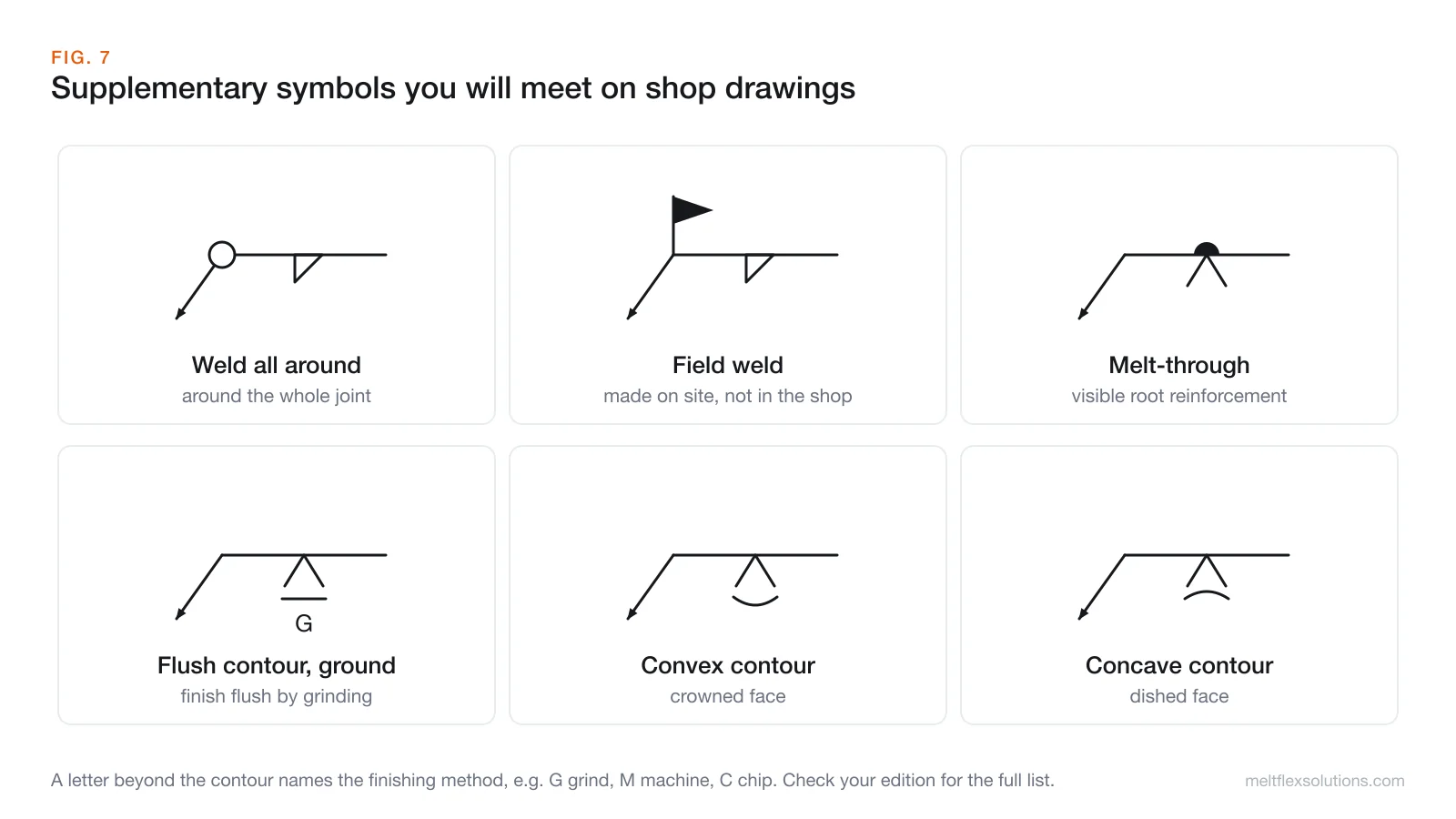
- Weld all around: the circle at the elbow. Common on tube-to-plate and column base connections.
- Field weld: the flag. It changes who makes the weld, when, and often how it gets inspected.
- Melt-through: a filled dome on the opposite side of the line from a groove symbol. It asks for visible root reinforcement on the back of a weld made from one side.
- Contour: a straight line (flush), an outward arc (convex) or an inward arc (concave) placed against the weld symbol describes the finished face.
- Finishing method: a letter beyond the contour says how to get there, for example G for grinding or M for machining. A flush contour with a G means "grind it flat", which is not the same as "weld it neat".
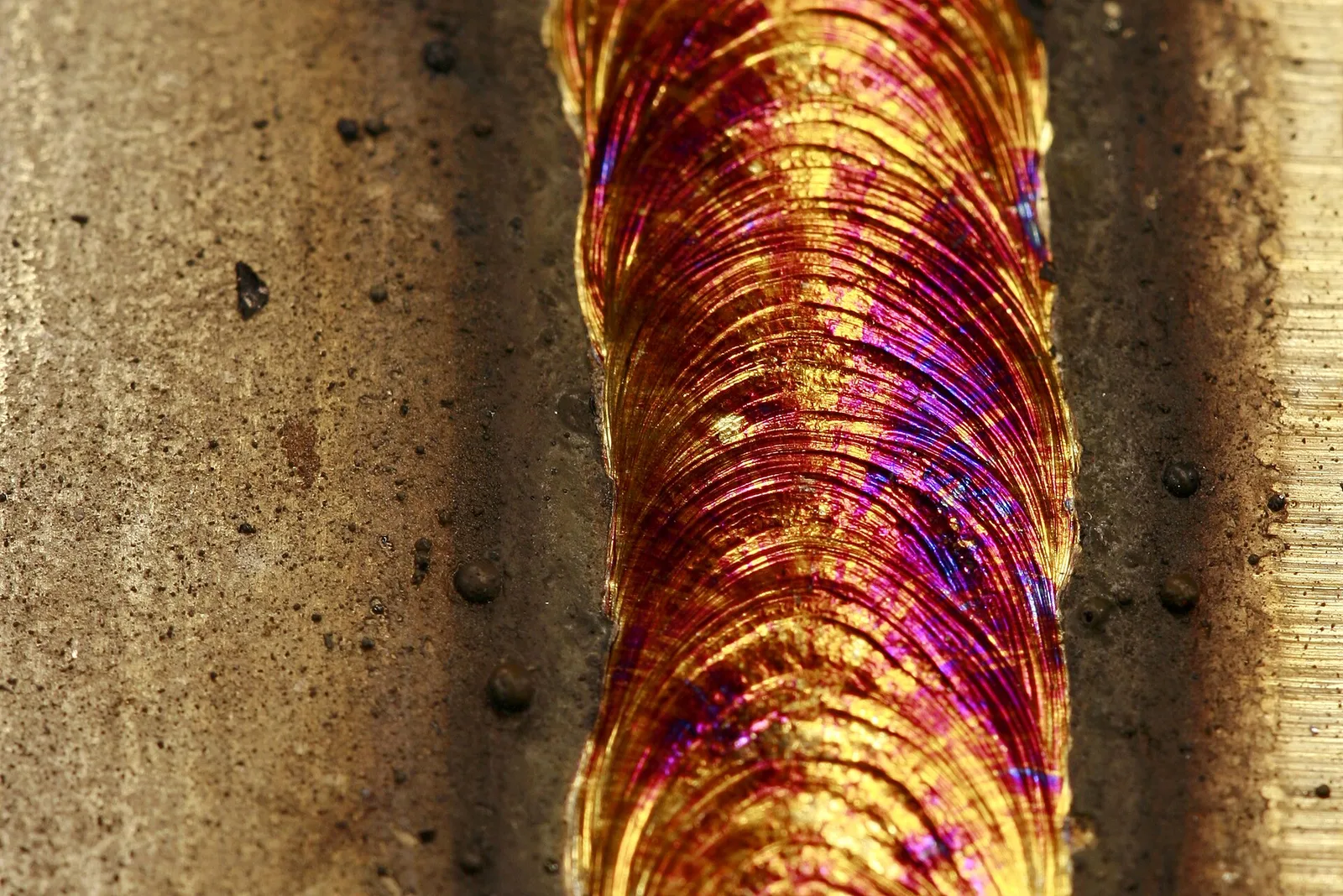
An as-welded stainless bead. A flush contour with a G finish means all of that ripple gets ground off; with no contour symbol, this surface is acceptable as it is.
When one joint needs several operations in a set order, a drawing can stack multiple reference lines on one arrow. The line nearest the arrow is done first.
AWS vs ISO 2553: the trap on international jobs
If your shop works from European drawings, or exports to Europe, this section will save you a scrapped part.
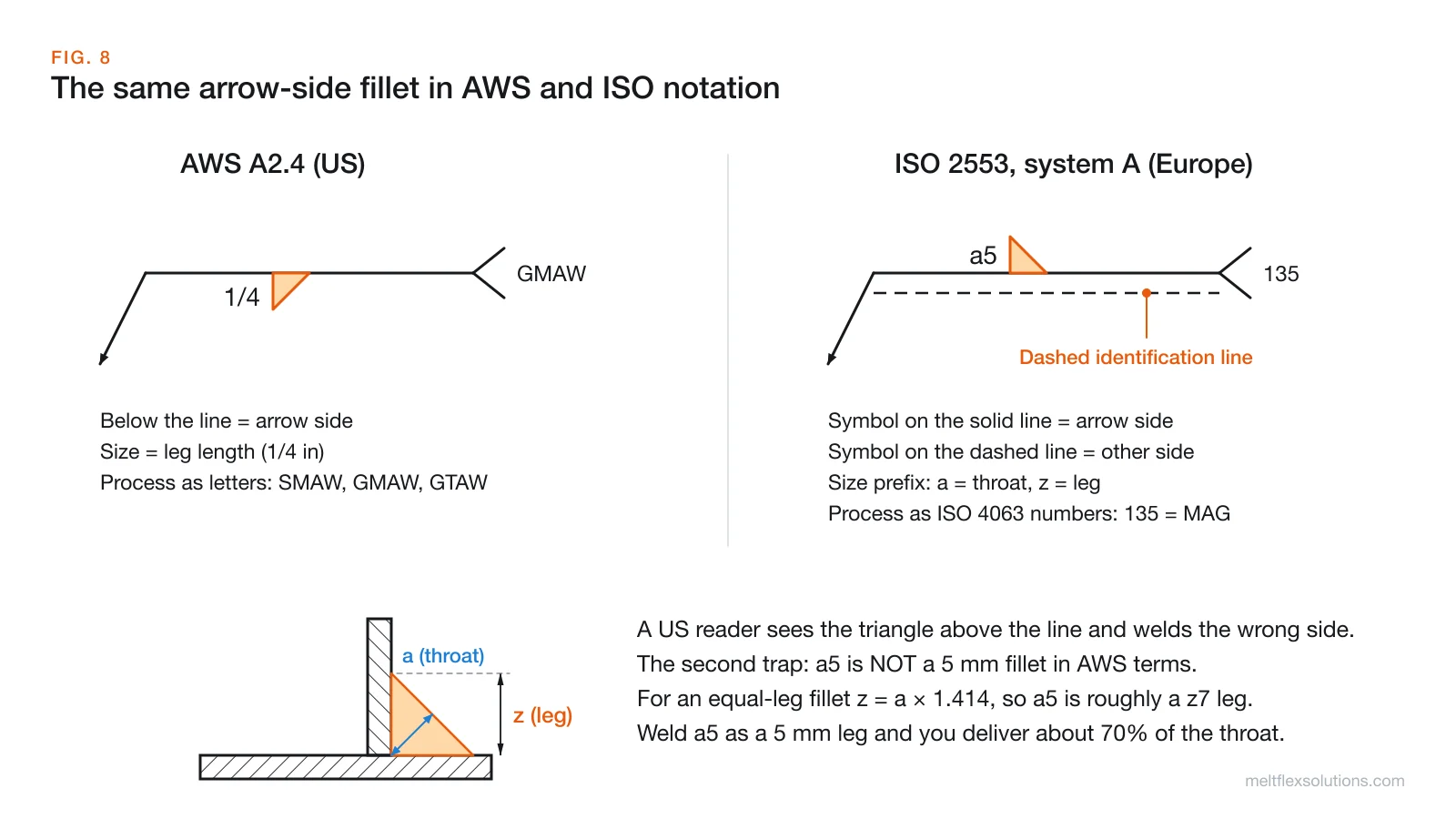
1. The dashed line. ISO 2553 (system A) draws a second, dashed identification line parallel to the solid reference line. A symbol sitting on the solid line is the arrow side; a symbol on the dashed line is the other side. The dashed line can sit above or below the solid one. So an ISO drawing can show an arrow-side fillet above the solid line, exactly where an AWS-trained reader expects the other side. The welder reads it the American way and welds the wrong face.
ISO 2553 also includes a system B that follows the Pacific-rim and AWS style (below means arrow side, no dashed line). If a drawing has no dashed line anywhere, ask which system it uses before assuming.
2. Throat vs leg. AWS fillet sizes are leg lengths. ISO sizes carry a letter: a for the throat thickness and z for the leg length. For an equal-leg fillet, the leg is the throat times 1.414. So:
| ISO callout | Means | Equivalent leg |
|---|---|---|
a3 | 3 mm throat | about 4.2 mm leg |
a5 | 5 mm throat | about 7.1 mm leg |
a7 | 7 mm throat | about 9.9 mm leg |
z5 | 5 mm leg | 5 mm leg |
Weld an a5 as a 5 mm leg and the throat comes out at about 3.5 mm, roughly 70% of what the engineer specified. It looks like a perfectly good weld, which is exactly why it gets through.
3. Process names. AWS uses letters in the tail (SMAW, GMAW, GTAW, FCAW). ISO uses the ISO 4063 numbers: 111 for manual metal arc, 135 for MAG, 141 for TIG and so on.
How to read any welding symbol in five steps
- Find the arrow and the joint it touches. That face is the arrow side.
- Look below the line, then above it. Below is arrow side, above is other side. On ISO drawings, check for the dashed line first.
- Name the weld from the shape: triangle, V, bevel, square, and so on.
- Read the numbers in order: size on the left, length and pitch on the right, depth and weld size for grooves, angle and root opening around the symbol.
- Check the corners and the tail: circle (all around), flag (field), contour and finish letters, and whatever process or spec the tail points to.
Video: welding symbol basics
Where TechDraw AI fits
Welding symbols live on a drawing, and on fabrication work the drawing is often the slow part. A repair bracket, a replacement gusset or a fixture someone made years ago usually exists as a physical part and nothing else.
That is the job TechDraw AI was built for. You take a photo of the part, type in one or two real lengths you measured, and it lays out the views, places the dimensions and adds a title block. Because the scale comes from your measured lengths rather than being guessed from pixels, the numbers on the sheet match the real part. The sheet metal and fabrication mode exports DXF, DWG or PDF, so the drawing opens straight in AutoCAD, SolidWorks or whatever your shop runs.
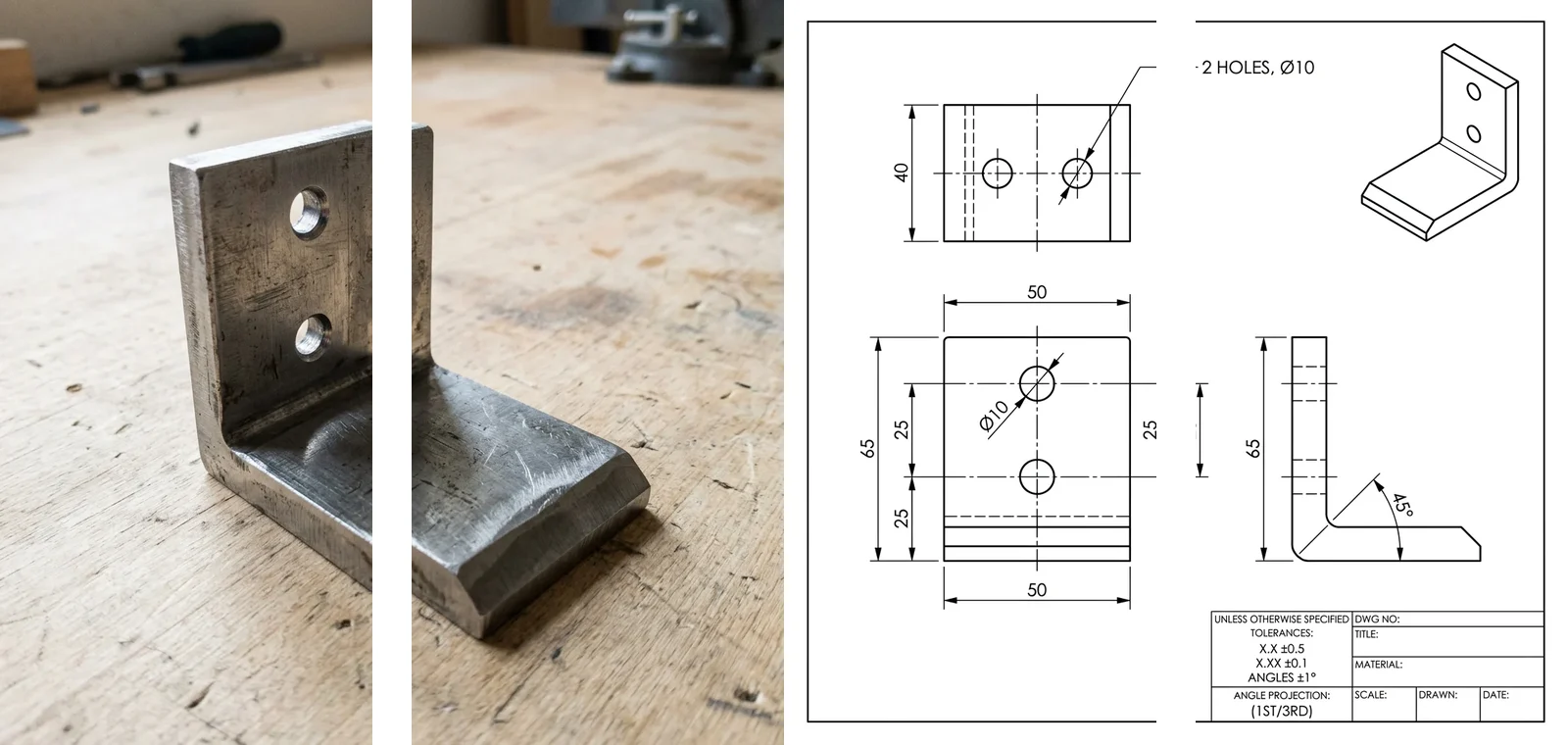
A real TechDraw AI output: a photo of an L-bracket in, a dimensioned three-view drawing out.
To be straight about the limits: TechDraw AI does not place welding symbols for you, and you should not want it to. The weld size, type and procedure are engineering decisions tied to loads and codes, not something to infer from a photo. The useful split is that the tool removes the redraw, and the person responsible for the joint adds the welding symbols in CAD, using everything in this guide.
Frequently asked questions
What does a welding symbol below the line mean?
A weld symbol below the reference line means the weld goes on the arrow side of the joint, the side the arrow touches. Above the line means the other side. This is the AWS A2.4 rule and also ISO 2553 system B. ISO 2553 system A uses a dashed line instead, and the side depends on whether the symbol sits on the solid or the dashed line.
What do the numbers on a fillet weld symbol mean?
The number to the left of the triangle is the leg size of the fillet. The numbers to the right are the length of each weld and the pitch, written as length-pitch. A symbol reading 1/4 2-6 means a 1/4 inch fillet in 2 inch long welds spaced 6 inches centre to centre. With no length, the weld is continuous.
What does the flag on a welding symbol mean?
The flag at the junction of the arrow and reference line is the field weld symbol. It means the weld is made on site during erection, not in the fabrication shop. Older drawings sometimes used a filled black circle for the same meaning.
What does the circle on a welding symbol mean?
An open circle where the arrow meets the reference line means weld all around: the weld continues around the entire joint, such as all the way around a tube or a base plate.
What is the tail on a welding symbol for?
The tail holds information that has no other place on the symbol, usually the welding process, a welding procedure specification (WPS) number or a reference to a note or spec. If nothing needs referencing, the tail is left off.
What is the difference between AWS and ISO welding symbols?
They share most weld shapes. The main differences: ISO 2553 system A adds a dashed identification line that marks the other side, ISO fillet sizes use a for throat thickness and z for leg length while AWS gives the leg, and ISO uses ISO 4063 process numbers such as 135 for MAG where AWS uses letters like GMAW.
Is a5 a 5 mm fillet weld?
No. In ISO notation a5 means a 5 mm throat thickness. For an equal-leg fillet that is a leg of about 7.1 mm. A 5 mm leg would be written z5 and gives only about 3.5 mm of throat.
Can AI add welding symbols to a drawing?
AI tools can draw a dimensioned part from a photo, which removes most of the redraw work, but the welding symbols should come from the person responsible for the joint. Weld type, size and procedure depend on loads and the governing code, which a photo cannot show.
Welding symbols reward slow reading: arrow, line, shape, numbers, corners, tail. Once that order is a habit, even a crowded steel shop drawing reads like a list of instructions. If you are also working through the views on those sheets, our guide to section views covers the cut views that welded assemblies are often drawn in, and how to read construction blueprints covers the sheets around them. For turning a sketch into a cut file, see sketch to DXF for CNC and laser.
Sources and further reading
- How to Read and Understand Weld Symbols, Miller Electric: plain-language walkthrough of the AWS A2.4 system.
- Fillet weld, Wikipedia: geometry, throat and leg terminology.
- Welding joint, Wikipedia: the joint types the symbols are applied to.
- AWS A2.4, Standard Symbols for Welding, Brazing, and Nondestructive Examination, American Welding Society.
- ISO 2553, Welding and allied processes, Symbolic representation on drawings, Welded joints, and ISO 4063 for welding process reference numbers.
Want drawings, cut files and paperwork to stop eating your shop's hours? Book a free call and we will show you where automation pays off first.
Image credits: diagrams by MeltFlex Solutions. Welder at the TVA Douglas Dam, 1943, by Alfred T. Palmer, public domain via Wikimedia Commons. Stainless steel weld bead by Tanel Eensoo, CC BY-SA 3.0 via Wikimedia Commons. Bracket photo and drawing from TechDraw AI.